GitHub Actions
A working CI/CD pipeline, the real 2026 minute math behind the free tier, and the mistakes that quietly burn your allowance before you notice.
Every “free CI/CD” tutorial says the same thing: connect your repo, drop in a YAML file, ship for nothing. That’s true for the first few weeks. Then a matrix build triples your minute burn, a Windows job eats double what you budgeted, or your team hits the 2,000-minute wall on a Tuesday afternoon and nobody knows why. This is the guide I wish existed before that happened to a project of mine.
We’ll build an actual pipeline, do the minute math with real 2026 numbers instead of rounded marketing figures, and go through the mistakes that turn “free” into a line item. If you already know what a workflow file is, skip to the minute math or the mistakes — everything else is here for people setting this up for the first time.
- What “free” actually includes in 2026
- The anatomy of a workflow file
- Building a real pipeline, step by step
- The minute math: what your team will actually use
- Six mistakes that burn your free minutes
- The security corner most tutorials skip
- When self-hosted runners make more sense
- GitHub Actions vs. GitLab CI vs. CircleCI
- Frequently asked questions
What “free” actually includes in 2026
GitHub Actions on standard GitHub-hosted runners is genuinely unlimited and free on public repositories — no minute cap, no catch. That part of the pitch is accurate. Private repositories are where the fine print starts, and it’s worth reading GitHub’s own billing documentation once rather than trusting a blog post (including this one) forever, because these numbers move.
| Plan | Included minutes / month | Artifact + package storage | Price |
|---|---|---|---|
| Free | 2,000 | 500 MB | $0 |
| Pro | 3,000 | 1 GB | $4/mo |
| Team | 3,000 | 2 GB | $4/user/mo |
| Enterprise Cloud | 50,000 | 50 GB | $21/user/mo |
Those minutes aren’t wall-clock minutes once you leave Linux. GitHub bills Linux jobs at a 1x multiplier, Windows at 2x, and macOS at 10x against the same pool. A 10-minute macOS build doesn’t cost 10 minutes of your allowance — it costs 100. This single fact explains more mystery overage bills than anything else in this article, and almost no onboarding tutorial mentions it.
A five-person team running a 12-minute macOS build on every pull request burns 120 allowance-minutes per run. At fifteen PRs a week, that’s 1,800 minutes — nearly the entire Free plan — from one job on one workflow.
Overage pricing changed on January 1, 2026: GitHub cut hosted-runner rates by up to 39%, folding a small per-minute platform charge into lower list prices. Once you exceed your included minutes, standard 2-core runners bill at $0.006/minute for Linux, $0.010/minute for Windows, and $0.062/minute for macOS. A separate $0.002/minute charge that GitHub had planned to add specifically for self-hosted runners was announced in December 2025 for a March 2026 rollout, then postponed within 48 hours after community pushback — it never actually took effect, and self-hosted runners remain free of any per-minute charge as of this writing. Several comparison sites published in early 2026 still describe that charge as live. It isn’t.
What actually counts against your minutes
- Standard GitHub-hosted runners on private repos. This is the pool the table above describes.
- Re-runs. A flaky test suite that needs two attempts bills as two full runs, not one plus a diff.
- Every job in a matrix, separately. A 4×4 matrix is 16 billed jobs even if they finish in parallel and feel instantaneous to you.
- Rounding. Every job rounds up to the next full minute. A 61-second lint job bills as 2 minutes.
What doesn’t count: standard runners on public repositories (unlimited), GitHub Pages builds, Dependabot version updates, and any job you run on a self-hosted runner — you pay for that machine instead, not per minute.
The anatomy of a workflow file
Every GitHub Actions pipeline is one YAML file living in .github/workflows/. It has four things you need to understand before writing your own: a trigger, jobs, steps, and runners.
# .github/workflows/ci.yml
name: CI

on:                        # the trigger — what starts this workflow
  push:
    branches: [main]
  pull_request:
    branches: [main]

jobs:                      # a workflow is one or more jobs
  test:
    runs-on: ubuntu-latest    # the runner — Linux is the cheap default
    steps:                  # steps run in order, top to bottom
      - uses: actions/checkout@v4
      - uses: actions/setup-node@v4
        with:
          node-version: '20'
          cache: 'npm'
      - run: npm ci
      - run: npm test
That’s a complete, working pipeline. Push it to .github/workflows/ci.yml and GitHub runs it on the next push or pull request automatically — no separate CI account, no webhook to configure, nothing to install. This is the actual reason GitHub Actions won the CI market from Travis CI and Jenkins: zero setup friction, not superior architecture.
Building a real pipeline, step by step
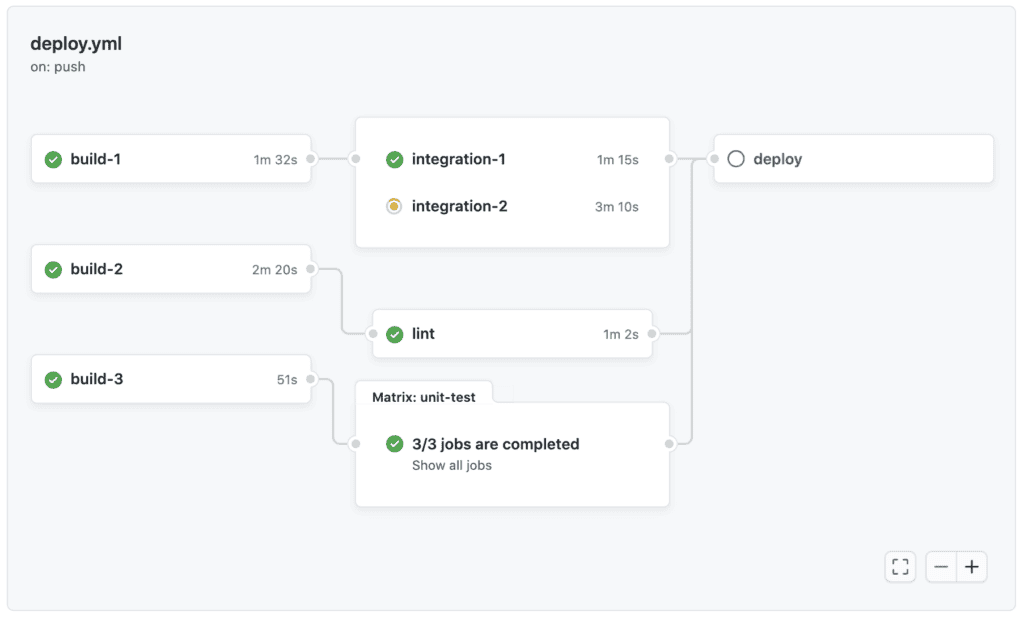
Here’s a pipeline that does something closer to what a real project needs: lint, test, build, and deploy — only pushing to production when the earlier stages pass, and only from the main branch.
Separate jobs by concern, not by convenience
Put lint, test, and build in separate jobs rather than one long job with many steps. Separate jobs run in parallel by default, which shortens wall-clock time, and a failure in one gives you a clear signal about what broke instead of a wall of mixed output.
Gate deployment behind needs and a branch check
The needs keyword makes one job wait for others to succeed. Combine it with an if condition on the branch so a broken pull request from a fork can never trigger a deploy.
Cache dependencies, not build output
The built-in cache: 'npm' option on setup-node covers most cases. Caching your actual build artifacts between runs (rather than dependencies) tends to cause more stale-state bugs than it saves in minutes — measure before you add it.
name: Build and Deploy

on:
  push:
    branches: [main]
  pull_request:

permissions:
  contents: read
  id-token: write     # needed for OIDC — see the security section

jobs:
  lint:
    runs-on: ubuntu-latest
    steps:
      - uses: actions/checkout@v4
      - uses: actions/setup-node@v4
        with: { node-version: '20', cache: 'npm' }
      - run: npm ci
      - run: npm run lint

  test:
    runs-on: ubuntu-latest
    steps:
      - uses: actions/checkout@v4
      - uses: actions/setup-node@v4
        with: { node-version: '20', cache: 'npm' }
      - run: npm ci
      - run: npm test -- --coverage

  build:
    needs: [lint, test]
    runs-on: ubuntu-latest
    steps:
      - uses: actions/checkout@v4
      - uses: actions/setup-node@v4
        with: { node-version: '20', cache: 'npm' }
      - run: npm ci && npm run build
      - uses: actions/upload-artifact@v4
        with: { name: dist, path: dist/ }

  deploy:
    needs: build
    if: github.ref == 'refs/heads/main'
    runs-on: ubuntu-latest
    steps:
      - uses: actions/download-artifact@v4
        with: { name: dist, path: dist/ }
      - run: echo "deploy dist/ to your host here"
Notice the permissions block near the top, scoped down to exactly contents: read and id-token: write. The default token GitHub issues to a workflow is broader than most jobs need; explicitly narrowing it is one line and closes off an entire category of blast radius if an action in your dependency chain ever misbehaves — which, as the security section below shows, has happened at real scale.
The minute math: what your team will actually use
Marketing pages quote the 2,000-minute allowance in isolation, which tells you nothing about whether it covers your team. Here’s the model, with every assumption stated so you can swap in your own numbers instead of trusting mine.
Assumptions: a Node.js web app, three Linux jobs per pipeline run (lint ~2 min, test ~4 min, build ~3 min = 9 minutes/run), 20 working days/month, and a range of pull-request volumes per day.
| PRs / day | Runs / month | Minutes used | % of Free plan |
|---|---|---|---|
| 2 | 40 | 360 | 18% |
| 5 | 100 | 900 | 45% |
| 8 | 160 | 1,440 | 72% |
| 11 | 220 | 1,980 | 99% |
| 15 | 300 | 2,700 | 135% — $4.20 overage at $0.006/min |
The honest takeaway: for a solo developer or a small team on a Linux-only stack, 2,000 minutes covers a genuinely active project — this model has to reach 11 pull requests every single working day before it’s exhausted. The Free plan runs out for teams, not individuals, and it runs out fastest for teams who add a matrix or a macOS/Windows leg without recalculating the math above. Double the per-run minute cost (add a second OS, or a slower test suite) and the crossover point roughly halves, to 5–6 PRs/day.
Six mistakes that burn your free minutes
1. Testing on every OS by default
A strategy.matrix across [ubuntu-latest, windows-latest, macos-latest] feels responsible. It also multiplies your bill by roughly 13x per matrix cell once you weight in the OS multipliers (1 + 2 + 10). Cross-platform testing on every commit is rarely necessary — reserve it for release branches or a nightly scheduled run, and test on Linux for everyday pushes.
2. No caching on package installs
npm ci without a cache re-downloads your entire dependency tree on every run. The one-line cache: 'npm' parameter on setup-node (or the equivalent for pip, Maven, Go modules) typically cuts install time by more than half — free minutes saved for free, with no added complexity.
3. Not using concurrency to cancel stale runs
Push three commits to the same pull request in ten minutes and, without a concurrency group, GitHub happily runs all three pipelines to completion — burning minutes on two runs whose results nobody will ever look at. Add:
concurrency:
  group: ${{ github.workflow }}-${{ github.ref }}
  cancel-in-progress: true
4. Re-running the whole pipeline on documentation-only changes
Use paths-ignore on your trigger to skip CI entirely for commits that only touch docs/ or *.md files. Small change, permanent minute savings on any project with active documentation.
5. Debugging with re-runs instead of local reproduction
Every re-run of a failed job counts as a fresh full run — GitHub does not diff or discount it. Reaching for “re-run failed jobs” five times while chasing a flaky test costs five full runs. act, the local GitHub Actions runner, or simply reproducing the failing command locally, is very often faster and always free.
6. Treating scheduled workflows as free background tasks
A schedule: cron workflow that runs every 15 minutes racks up 2,880 runs a month regardless of whether anything changed. If the job is a health check or a cache warmer, a longer interval (hourly, or even every six hours) is usually indistinguishable in practice and costs a fraction of the minutes.
The security corner most tutorials skip
In March 2025, the widely used third-party action tj-actions/changed-files — installed in more than 23,000 repositories — was compromised when an attacker gained access to a maintainer credential and retroactively rewrote its version tags to point at malicious code. For roughly 15 hours, any workflow that referenced the action printed CI/CD secrets directly into build logs, which are world-readable on public repositories. The incident was tracked as CVE-2025-30066 and confirmed by CISA.
This isn’t a scare story to sell you a scanning product — it’s the concrete reason three specific habits matter more than any other security advice in this guide:
Pin third-party actions to a commit SHA, not a version tag. uses: tj-actions/changed-files@v46 can be silently repointed by whoever controls that tag. uses: tj-actions/changed-files@a1b2c3d... cannot — a SHA is immutable. Dependabot can keep pinned SHAs current automatically, so this costs you nothing ongoing.
Scope the GITHUB_TOKEN permissions explicitly on every workflow, as in the permissions: block earlier in this guide, rather than relying on the (broader) repository default.
Use OpenID Connect for cloud deployments instead of long-lived secrets. OIDC lets GitHub Actions request a short-lived credential from AWS, Azure, or GCP at run time — nothing permanent to leak if a future action is ever compromised the same way.
When self-hosted runners make more sense
Self-hosted runners cost nothing per minute on any GitHub plan — you install GitHub’s runner agent on your own machine (a spare desktop, a cloud VM, a Kubernetes pod) and it picks up jobs from your queue. The trade is that you now own patching, scaling, and security isolation, work that GitHub otherwise does for you.
It tends to make sense once you’re consistently paying meaningful monthly overage, need hardware GitHub doesn’t offer (a GPU for ML training, an ARM device for embedded builds), or need jobs to run inside a private network to reach internal resources without a VPN tunnel. Below that threshold, the operational overhead of running your own runner infrastructure usually costs more in engineering time than the minutes it saves.
GitHub Actions vs. GitLab CI vs. CircleCI
If your code already lives on GitHub, Actions is the default for a reason — zero migration cost. But the free-tier comparison is worth knowing before you assume it’s automatically the most generous option, because it isn’t always.
| Platform | Free minutes/mo (private repos) | Linux overage rate | Self-hosted runners |
|---|---|---|---|
| GitHub Actions | 2,000 | $0.006/min | Free, no platform fee |
| GitLab CI (SaaS) | 400 | $0.010/min | Free and unlimited on every tier |
| CircleCI | ~3,000 (30,000 credits) | ~$0.006–0.012/min (resource-class dependent) | Available on paid plans |
GitLab’s headline free allowance looks stingy next to GitHub’s by comparison, but its self-hosted runners are unlimited and free on every tier including Free — a team willing to run its own runner never touches the 400-minute ceiling at all, which is GitLab’s actual answer to the gap. CircleCI’s credit-based free tier is roughly comparable to GitHub’s out of the box, with pricing that shifts by machine resource class rather than a flat per-minute rate, which makes it harder to estimate from a table like this one — check their current calculator for your specific job profile before committing.
Frequently asked questions
Yes, unconditionally, if the repository is public — there’s no minute cap on standard runners. For a private personal repo, you get 2,000 free minutes a month on the Free plan, which comfortably covers a solo developer’s normal usage per the model above.
No. Included minutes reset to the full allowance at the start of each billing cycle; unused minutes don’t carry forward.
macOS runners consume your minute allowance at 10x the wall-clock time. A 6-minute macOS job draws 60 minutes from your pool — this is almost always the cause of an unexpectedly fast overage.
GitHub doesn’t charge a per-minute fee for them, and a proposed platform charge for self-hosted usage was announced and then withdrawn before it ever took effect. You do pay for the machine itself and the time spent maintaining it.
Yes — organization and personal accounts both have a spending limit setting (default $0 on Free accounts) under billing settings. At $0, workflows simply stop running once you exceed included minutes rather than incurring a charge.
Add a concurrency group with cancel-in-progress: true. It’s a three-line addition and directly eliminates minutes spent on superseded runs, which is one of the largest sources of waste on active pull requests.
It’s lower-priority for actions published and maintained directly by GitHub (like actions/checkout) than for smaller third-party actions with a single maintainer, which is exactly the profile of the action compromised in the March 2025 incident. If you want maximum protection, pin everything; if you’re triaging effort, start with third-party actions outside the actions/ and github/ organizations.
Yes. Billing is based on runner time consumed, not outcome — a job that fails after 4 minutes bills 4 minutes exactly like one that passes.
No — Actions only runs against GitHub-hosted repositories. If you’re on GitLab or Bitbucket, their native CI (GitLab CI, Bitbucket Pipelines) avoids a cross-platform integration entirely, and the comparison table above gives you their free-tier numbers to weigh the switch.
Figures and dates in this article were verified against GitHub’s official billing and pricing documentation and, for the March 2025 security incident, CISA’s public advisory and independent security research (Wiz, StepSecurity, Unit 42). Vendor pricing changes without notice — check the current billing page for your account before making a budget decision based on this or any other guide. See our methodology for how we verify claims across CodeTalentHub.