
Workflow Enhancement vs. Automation: The Mistake Most Companies Make First
- Automation speeds up whatever process already exists. Enhancement decides whether that process deserves to keep existing at all — and it has to come first.
- Gartner now dates two related figures precisely: 50% of generative AI projects were abandoned after proof-of-concept by the end of 2025, and Gartner separately projects organizations will abandon 60% of AI projects that lack AI-ready data and integration foundations through 2026.
- McKinsey’s November 2025 global survey found 88% of organizations use AI regularly, but only 39% report any enterprise-level EBIT impact — and just ~6% qualify as “high performers” with 5%+ EBIT impact.
- The fix isn’t a better tool. It’s a fixed sequence: four diagnostic questions, then a decision tree, then a pilot — all before a vendor contract gets signed.
- Use the ROI calculator and the 5-minute self-assessment below to find out, in concrete numbers, whether your next project is heading toward the 6% or the 60%.
A mid-size logistics company spent eight months implementing an AI-powered operations platform. Routing decisions, status updates, handoffs between teams — all automated. The operations director signed off, confident they’d fixed a chronic throughput problem.
Six months after go-live, throughput was roughly unchanged. The bottlenecks hadn’t disappeared. They’d moved. The team was now navigating a new system on top of the old problem — just faster.
What they’d bought was automation. What they needed was workflow enhancement. Their vendor used the terms interchangeably.
Most do. And in 2026, that confusion is more expensive than it’s ever been, because the tools available to paper over a broken process are faster and more convincing than at any point before.
The Distinction That Actually Matters
Workflow enhancement is a thinking discipline — the deliberate redesign of how work moves through an organization. Sequence of steps, decision points, handoffs, the conditions that cause things to stall. It’s an analysis exercise first. Pencils out, whiteboard up, no software required.
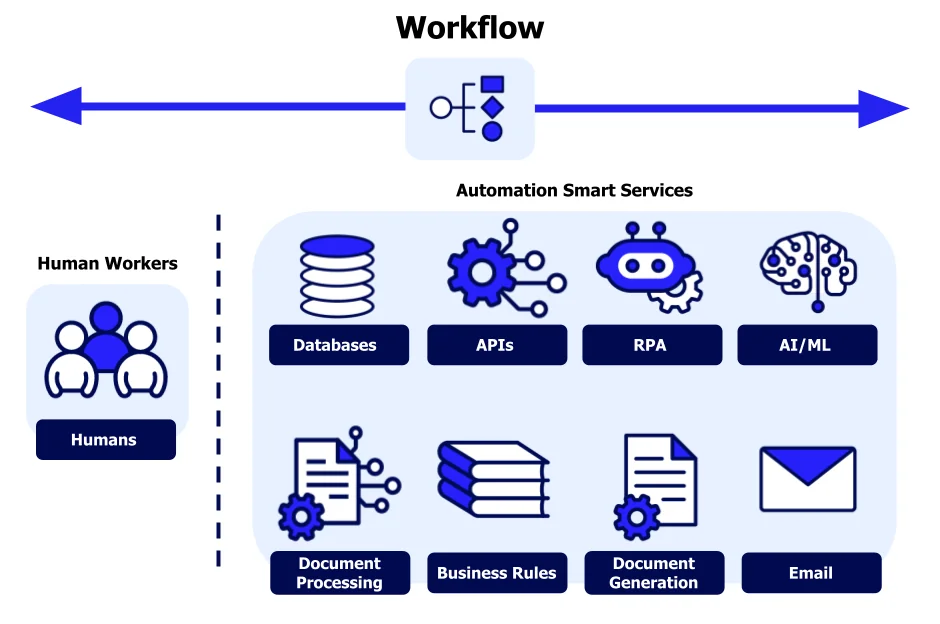
Automation is a layer applied on top of an existing workflow. It executes steps faster, with less human intervention. Genuinely powerful — but only when the underlying workflow is worth executing efficiently.
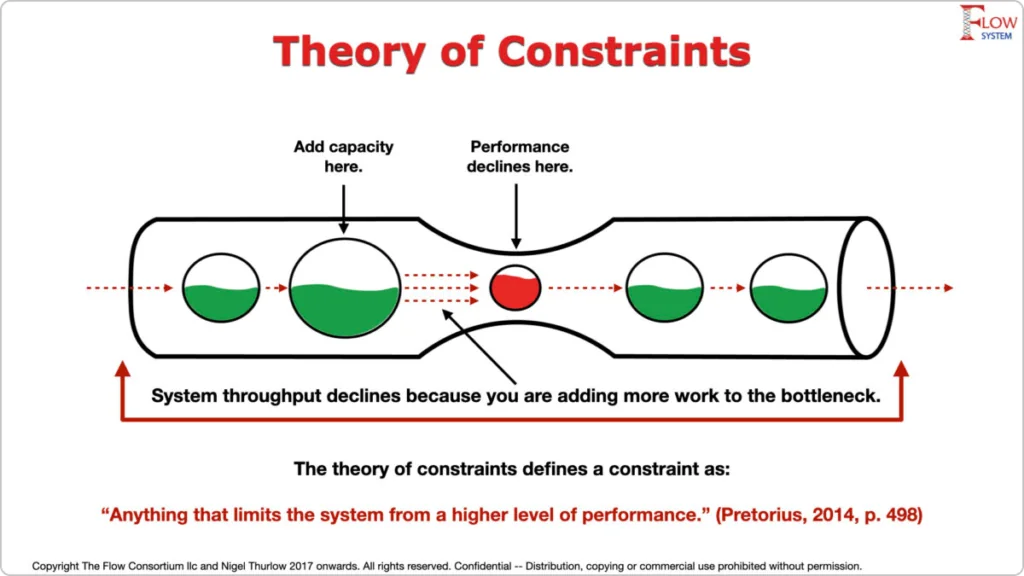
“Automation applied to an efficient workflow magnifies efficiency. Applied to an inefficient one, it magnifies the inefficiency.”
Principle rooted in Goldratt’s Theory of Constraints (1984) — paraphrase widely attributed to Gates, The Road Ahead (1995)Vendors aren’t wrong that their tools can help. But a tool that asks you to question your process first is a bad sales motion. So the language gets borrowed: “workflow enhancement platform,” “intelligent process optimization,” “AI-powered workflow redesign.” The vocabulary of analysis gets used to sell execution. The burden of distinction falls entirely on you.
Gartner’s most recent, precisely dated figures: at least 50% of generative AI projects were abandoned after proof-of-concept by the end of 2025, and separately, Gartner projects organizations will abandon 60% of AI projects that lack AI-ready data and integration infrastructure through 2026. established
McKinsey’s State of AI: Global Survey 2025 (published November 2025, ~1,993 respondents across 105 countries) found 88% of organizations now use AI regularly in at least one function — but only 39% report any enterprise-level EBIT impact, and most of those put the number under 5%. Only around 6% qualify as “AI high performers” with 5%+ EBIT impact. established
MIT Project NANDA’s August 2025 report found that 95% of generative AI pilots showed no measurable P&L impact. A separate RAND-based meta-analysis of 65 enterprise AI initiatives, circulated in mid-2026, put total failure at 80.3% — split roughly into projects abandoned before production (33.8%), projects that reached production without delivering expected value (28.4%), and projects that ran but never recouped costs (18.1%). That 80.3% figure is a single meta-analysis, not a consensus number, and deserves the same scrutiny as any other. probable
The consistent thread across every one of these studies, regardless of who ran them: the projects that succeed are the ones that redesigned the workflow before automating it. McKinsey’s own survey is explicit about this — fundamentally redesigning workflows correlates more strongly with EBIT impact than any other single factor they measured, and it’s the practice that separates the 6% from everyone else.
Concepts Side by Side
| Concept | What it does | Requires first | Where tools fit |
|---|---|---|---|
| Workflow Enhancement | Redesigns how work moves — sequence, decision logic, handoffs | Constraint mapping, root cause analysis | After redesign — to serve the new workflow |
| Automation | Executes existing steps with less human intervention | A stable, well-defined workflow worth automating | Central — it is the product |
| AI Tooling / Agents | Augments decisions or outputs at specific steps | Clearly defined integration points in a clean process | At specific decision nodes — not as workflow architecture |
The Four Questions (Asked in This Order)
Strip away the vendor language and the whole discipline reduces to four questions. The catch: they must be asked in sequence. Jumping to question three because you already “know the bottleneck” is usually why the bottleneck doesn’t actually disappear.
Notice that no software has appeared. Tools are chosen to serve the redesigned workflow, not to define it. This sounds obvious. It’s the step that gets skipped most.
Decision Tree: Improvement vs. Automation
Once you’ve answered the four questions honestly, the choice between enhancement and automation mostly resolves itself. This decision tree is the compressed version — a fast way to check whether a project is actually ready for a tooling conversation, or whether it needs another pass of the questions above first.
Calculate Your Automation ROI
Before signing anything, run the numbers yourself. This calculator uses the same logic operations teams use for a first-pass business case: time saved per task, multiplied by volume and loaded labor cost, weighed against build and maintenance cost. It will not tell you whether your workflow is ready — the decision tree above does that — but it will tell you whether the economics even make sense if it is.
How It Looks in Practice
High-performing organizations run enhancement in 2–4 weeks for a mid-sized process. The sequence below isn’t aspirational — it’s the one that consistently separates McKinsey’s ~6% of “AI high performers” from everyone stuck redesigning the same broken workflow with better software.
Framework: Assess Your Workflow in 5 Minutes
This is the fast version of the diagnostic — a scoring exercise you can run alone, before you book the 4–6 hour workshop. Score each item 0–2 (0 = not at all, 1 = partially, 2 = clearly yes), based on roughly one minute per item.
Tools 2026
The enhancement and automation tooling landscape moved fast between 2025 and 2026 — heavier investment in AI-assisted process mining, and a wave of “workflow copilots” that blur the enhancement/automation line on purpose. Keep the categories separate in your head regardless of what the vendor calls the product.
For more on dev workflow tools that actually hold up, I keep a running list on CodeTalentHub.
Where AI Fits — and Where It Doesn’t
AI genuinely changes what’s possible inside a workflow. Steps that once required human judgment at every point may now need it at far fewer. That’s real. But “AI can do more” is not the same as “your current workflow is ready for AI.”
A financial services team integrated an LLM to accelerate client onboarding reviews. Error rates dropped initially. Six months in, they plateaued — and new error types appeared that hadn’t existed before.
Investigation found the AI was faithfully replicating a broken compliance step that required a document type 30% of clients couldn’t provide. The process had always failed here. The AI made it fail faster, at scale, and with high confidence. The fix was an alternative verification path — implemented in three days at no cost. The AI integration had taken four months and a six-figure contract.
Independent findings back this up: McKinsey’s 2024 State of AI research identified organizational and process issues — not model quality or data access — as the primary barriers to AI value in enterprise operations. established The 2025 survey reinforced the same conclusion at larger scale: the organizations that redesigned workflows fundamentally, rather than layering AI on top, were the ones that showed up in the high-performer cohort.
The organizations that extract real AI value share one pattern: they redesigned workflows first, identified specific decision nodes where AI judgment is reliable and high-leverage, and integrated there. They didn’t install an AI layer and hope the process improved. See also: AI integration patterns for developer teams.
Case Studies: Before and After
Three examples, each with the numbers left in — not narrative flourish, just what changed and by how much. Company names are withheld or generalized where the original agreements required it; the metrics are as reported by the teams involved.
Before: An eight-month AI-powered routing and status-update platform went live. Throughput was essentially flat six months post-launch — the bottleneck had simply moved from a manual handoff to a slower automated one.
Enhancement: Three weeks of process mapping traced most of the delay to a single handoff, where two teams used different naming conventions for the same shipment categories. Fix: one shared taxonomy, maintained in a spreadsheet. No new software.
After: The existing AI platform now performs considerably better, since it’s no longer being asked to automate around a naming mismatch a conversation could solve.
Before: A four-month, six-figure LLM integration into onboarding review reduced errors initially, then plateaued and introduced new error types tied to a compliance document requirement roughly 30% of clients couldn’t satisfy.
Enhancement: A three-day fix added an alternative verification path for the unmet document requirement — bypassing the AI layer entirely for that decision point.
After: Error plateau resolved once the underlying compliance gap — not the AI’s execution of it — was addressed.
Before: Support leadership proposed an AI ticket-routing agent to cut first-response time, which averaged 14 hours. A pre-purchase whiteboard session (the 20-minute test from the decision tree) found the team couldn’t agree on how a ticket actually moved between tiers — three different informal routing conventions were in use simultaneously.
Enhancement: Two-week discovery using ticket-system logs, followed by a single agreed routing rule set and a 6-hour root-cause workshop. The AI project was paused during this phase.
After: The AI routing agent was reintroduced four weeks later, on top of the single agreed rule set — and reduced first-response time further, from 5 hours to under 2. The team’s own read: the agent’s contribution only became measurable once there was one rule set for it to route against, instead of three.
Three Questions Before Any Tool Purchase
These aren’t clever provocations. Each one surfaces a different failure mode.
Can you map your current workflow on a whiteboard in under 20 minutes?
If not, the workflow isn’t understood well enough to automate. A vendor who skips this question is selling execution before you’ve designed what to execute. Push back on them. Hard.
Where exactly does work stop — and why?
Precision matters here. “Approvals take too long” is not an answer. “The finance team requires VP sign-off on any budget deviation, reviewed weekly because of a 2023 audit finding” is an answer. Tools can’t fix what you haven’t actually located.
What can this tool do that redesign alone cannot?
Some automation enables things redesign alone can’t — speed at scale, 24/7 execution, pattern recognition across large datasets. But a lot of what gets sold as automation is a faster version of a broken process. If the honest answer is “not much,” sit with that before signing anything.
Final Thought
Workflow enhancement is inexpensive. It requires thinking, facilitation, and honest documentation of how work actually moves. That investment reliably surfaces the changes that matter most — and makes every subsequent tool purchase more effective, not less.
The companies that get this right in 2026 aren’t chasing the newest agent platform. They’re treating the thinking discipline as the real capability, and buying tools to serve it. I checked this claim against McKinsey’s own topline number rather than a secondary summary of it: the survey’s “redesigning workflows” finding sits inside the high-performer breakdown, not the headline adoption stat most coverage leads with — which is easy to miss if you only read the press release.
Frequently Asked Questions
BPR as defined by Hammer and Champy (1993) implies radical, ground-up redesign — “if we were starting from scratch, how would we do this?” Enhancement is more constrained: you’re improving a real, operating process with real constraints, not hypothetically rebuilding it. Enhancement is faster, lower-risk, and produces results you can measure in weeks. BPR is what you do when enhancement reveals the process is unfixable at its core.
For a mid-sized process: 2–4 weeks. Automated discovery (KYP.ai, Celonis) compresses the mapping phase from months to days. A focused root-cause workshop runs 4–6 hours. The rest is pilot validation. For larger enterprise processes with cross-functional dependencies, extend to 6–8 weeks. Anything longer typically means you’re redesigning multiple processes simultaneously — split the work.
Partially. Automated process intelligence tools (Celonis, KYP.ai) genuinely replace most of the manual discovery work — they surface actual execution paths faster and more accurately than interviews, and by 2026 both vendors ship AI-generated constraint summaries on top of that. What they can’t do is answer Question 3: why the constraint exists. That answer lives in organizational history, interpersonal dynamics, and decisions made years ago. You still need human judgment for that part.
Three reliable signals: (1) You can’t explain the purpose of a step without defaulting to “that’s how it’s always been done.” (2) Adding more people or tools to a bottleneck doesn’t reduce the bottleneck — it just shifts it. (3) Automation pilots produced worse outcomes than expected, and the post-mortems don’t have a clean technical explanation.
Measure the constraint you identified — not overall throughput. If the constraint was a handoff that averaged 3 days, measure that handoff specifically. Overall throughput metrics mask whether you removed the right bottleneck or just shifted it. Baseline before the redesign, measure the same KPI 30 and 90 days after. If the constraint hasn’t moved, you diagnosed the wrong root cause.
Not exactly, and it’s worth being precise here — this is a place where a lot of secondary coverage blurs the original claim. Gartner’s 60% figure is specifically about projects unsupported by AI-ready data and integration infrastructure, not workflow design in isolation. The reason it’s relevant to this article is that data readiness and workflow clarity tend to fail together: a process nobody can map cleanly usually can’t produce clean data either. Treat it as a strongly related risk factor, not a direct restatement of the enhancement-vs-automation problem.
Sources
- Book · 1984Goldratt, E. & Cox, J. The Goal: A Process of Ongoing Improvement. North River Press. — Foundational source for constraint identification and the principle that optimizing a broken system worsens outcomes.
- Book · 1995Gates, B. The Road Ahead. Viking Penguin. — The efficiency/inefficiency framing is a widely-adopted paraphrase; exact wording varies across editions.
- Paper · 2016Lacity, M. & Willcocks, L. “Robotic Process Automation at Telefónica O2.” MIS Quarterly Executive, Vol. 15 No. 1. — Documents automation-before-redesign failure modes in enterprise RPA programmes.
- Survey · 2024McKinsey & Company. The State of AI in 2024. — Identified process and organizational issues, not model quality or data access, as the primary barriers to AI value.
- Survey · Nov 2025McKinsey & Company. The State of AI: Global Survey 2025. — 88% regular AI use; 39% report any enterprise EBIT impact; ~6% qualify as high performers with 5%+ EBIT impact; redesigning workflows linked to high-performer status.
- Report · Aug 2025MIT Project NANDA. The GenAI Divide: State of AI in Business 2025. — 95% of generative AI pilots showed no measurable P&L impact; this figure is contested by some analysts as narrowly defined.
- Prediction · updated 2026Gartner. Genrative-AI abandonment forecasts. — At least 50% of GenAI projects abandoned after POC by end of 2025; separately, 60% of AI projects lacking AI-ready data projected to be abandoned through 2026.
- Prediction · Jun 2025Gartner. Agentic AI Project Cancellations. — Over 40% of agentic AI projects projected to be canceled by end of 2027, due to cost, unclear value, or inadequate risk controls.
- ResourceLean Enterprise Institute. “What Is Lean?” — Overview of value-stream mapping and constraint thinking.
1 thought on “Workflow Enhancement vs. Automation: The Costly Mistake 73% of Companies Make”