

- Framework
- Mistakes
- Strategies
- 30-Day Plan
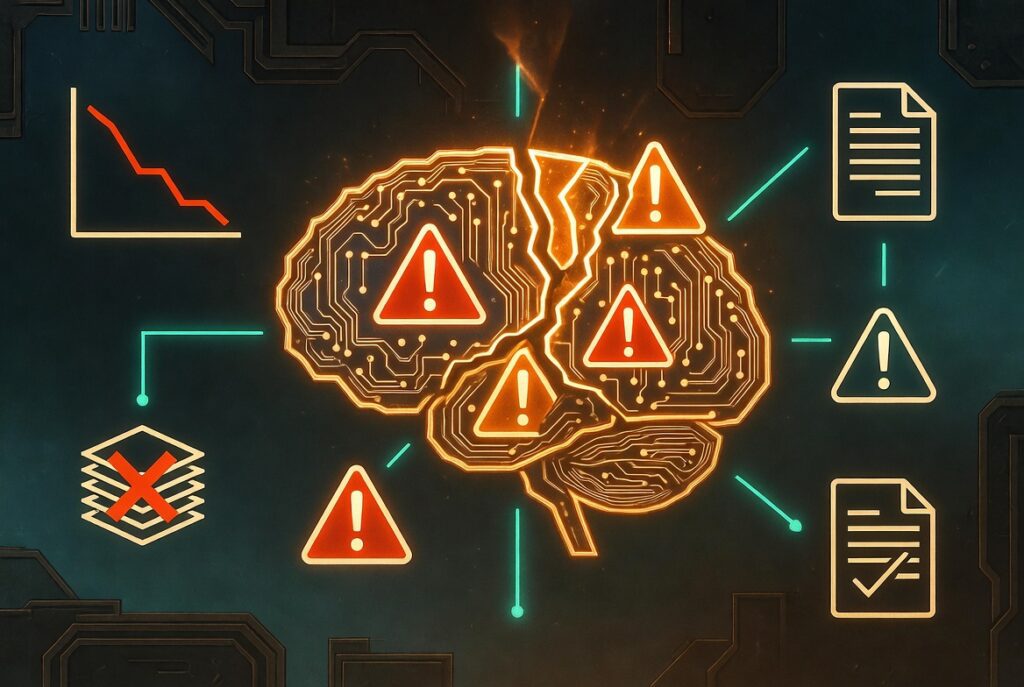
Most deployments hit peak deflection at launch, then quietly bleed CSAT for six months while leadership reads vendor dashboards. Here’s how to be the team that doesn’t.
The difference between AI-support deployments that sustain results and ones that disappoint isn’t the tool — it’s the sequence. Teams that build intent taxonomy and escalation logic before configuring AI consistently outperform teams that configure first and retrofit the foundation later. This guide tells you exactly what that sequence looks like, week by week.
Let me be direct about something vendors won’t tell you: the ROI numbers in AI-support case studies come from the top 15% of deployments. Not the median. Not yours, probably — at least not at first. The teams represented in those charts had one thing in common before they ever touched an AI configuration screen. They knew exactly what their top 20 contact types were, had labeled historical data for each, and had defined what “resolved” actually meant for every single one. That’s not sexy. But it’s the work.
This guide is built around that inconvenient truth. Everything here — the framework, the mistake breakdowns, the 30-day plan — assumes you’re willing to do the operational foundation work before the visible AI work. If that’s you, keep reading. If you’re looking for a shortcut past the foundation, no framework will save you, and I’d rather be honest about that upfront.
Evidence baseline, stated upfront: AI-support tools interact with dozens of operational variables — ticket volume, channel mix, agent skill distribution, product complexity, CRM integration quality. No study cleanly isolates their contribution. The patterns here come from practitioner observation, published vendor benchmarks (which carry selection bias toward successful deployments), and industry reports. Use your own FCR, CSAT, and AHT data as the primary feedback signal. They’re the only numbers that are actually about your operation.
01 / Definition What AI-Support Tools Actually Means — and Why the Vendor Definition Misleads You
Here’s the textbook version: AI-support tools are software systems that use machine learning to automate, augment, or accelerate customer service workflows — ticket routing, response drafting, knowledge retrieval, agent coaching — with the goal of reducing resolution time and improving answer accuracy without proportionally increasing headcount.
Fine. Now here’s the version practitioners actually care about.
In practice, a useful AI-support tool does exactly one of three things clearly: it deflects contacts that don’t need a human, it accelerates contacts that do, or it surfaces knowledge that agents can’t retrieve fast enough under volume pressure. Tools that try to do all three simultaneously — before the operational foundation supports it — typically underperform on all three. That failure pattern is behind most disappointing AI deployments, and it’s the gap this guide addresses.
The Distinction That Changes Everything: Automation vs. Augmentation
Vendor marketing conflates two fundamentally different things. AI automation replaces human handling entirely. AI augmentation makes human handling faster and more accurate. The distinction matters enormously for implementation strategy, success metrics, and — critically — how you communicate the rollout to your team.
Automation is appropriate for high-volume, low-complexity, well-defined contact types: password resets, order status checks, policy FAQs. Augmentation is appropriate for complex, judgment-dependent, emotionally sensitive contacts where replacing the human isn’t the goal — but the 90-second knowledge retrieval delay under call pressure is the problem worth solving.
Deploying an automation-first tool on augmentation-appropriate ticket types is the single most common cause of CSAT drops in early AI rollouts. And it happens constantly, because vendors are incentivized to maximize deflection scope, not to tell you which contacts shouldn’t be deflected yet.
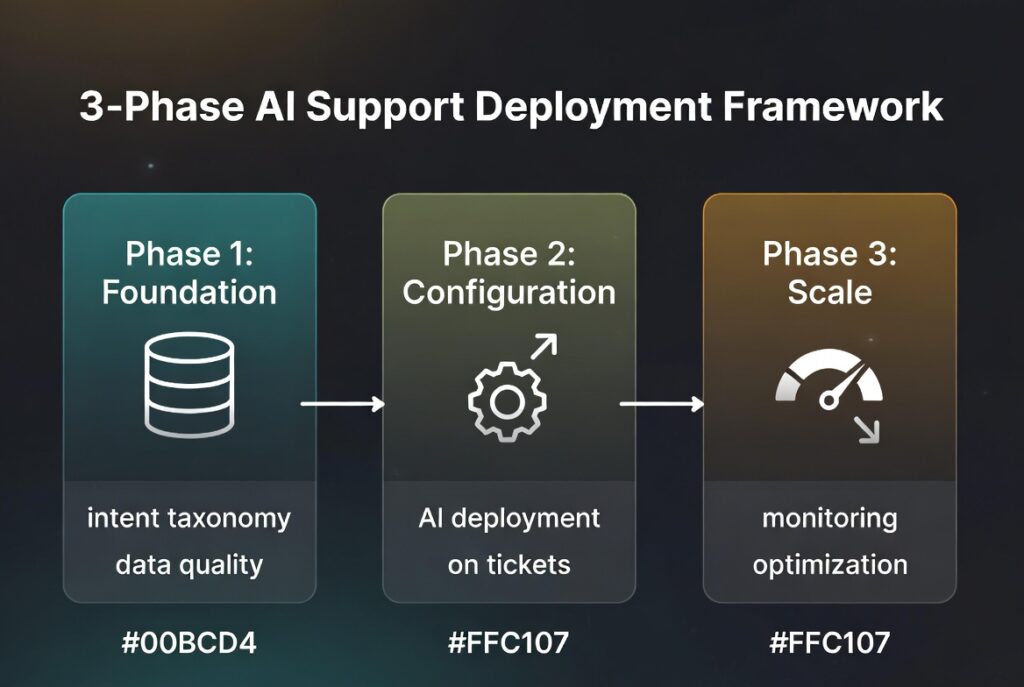
02 / Framework The 3-Phase Deployment Framework — And the Phase Most Teams Skip
Here’s the conflict of interest worth naming before I present this framework: Phase 1 doesn’t require any vendor product. It’s operational foundation work — intent taxonomy, data labeling, escalation logic. Vendors have zero financial incentive to tell you this phase is essential, which is exactly why most of them don’t. They’re not lying. They’re just optimizing for a different outcome than yours.
Intent taxonomy and training data quality
Document your top 20 contact intent types. For each: a labeled dataset of at least 500 historical tickets (1,000+ is better), a clear resolution path, and an explicit definition of what “resolved” means — not just ticket closure. Build escalation logic: for every intent type, define the conditions that must route to a human, and why. This is the work that bounds everything else. The AI’s eventual performance is limited by the quality of this foundation. Build it first.
Selective deployment on the lowest-stakes contact types first
Deploy against your highest-volume, lowest-stakes contact type — not your highest-volume overall. “Order status” before “refund request,” even if refund requests have higher volume, because the failure mode of a wrong order status response is recoverable. The failure mode of a mishandled refund request is a chargeback and a churned customer. Measure deflection rate and CSAT simultaneously. If deflection climbs while CSAT drops, you don’t have a success — you have a quality problem hidden behind a volume metric.
Continuous intent drift management
Contact intent distributions shift as products evolve, pricing changes, and customer cohorts change. An AI trained on last year’s ticket distribution will gradually degrade against this year’s contacts — usually slowly enough that no single week triggers an alarm, but fast enough that a quarterly review reveals meaningful CSAT erosion. Monthly intent audits — a random sample of 50 AI-handled tickets scored for classification accuracy and response appropriateness — are the operational practice that separates deployments that sustain results from ones that peak at launch and quietly disappoint.
The Knowledge Base Problem Nobody Talks About
I spoke with a support team at a UK fintech that spent six months optimizing their AI configuration while their knowledge base had roughly 40% outdated articles. Their first-contact resolution rate with AI active was actually lower than their agents’ manual rate — because the AI was confidently retrieving wrong answers from stale content. The model didn’t know the answers were wrong. It had high confidence in outdated information, which is a different failure mode than the one most teams audit for.
When they cleaned the knowledge base before expanding AI scope, FCR improved 22% in the following quarter. Observed, not controlled — other factors were present. But the pattern is consistent enough across similar reports that the lesson holds: knowledge base quality is an AI capability constraint, not an AI deployment prerequisite you check once.
“The AI’s eventual performance is bounded by the quality of the foundation — and most vendors will happily skip past the foundation because building it doesn’t require their product.”
— The central problem with most AI-support deployments| Signal | Phase-skipping deployment | Sequenced deployment | Impact |
|---|---|---|---|
| Intent taxonomy | Broad categories, unvalidated | 20+ intents, 500+ labeled examples each | Critical |
| Deployment scope | All contact types at launch | 1–2 lowest-stakes types first | Critical |
| Primary success metric | Deflection rate only | Deflection rate and CSAT held simultaneously | Critical |
| Knowledge base | Deployed as-is, audited once | Audited, updated, tied to product release cycle | Critical |
| Intent drift monitoring | Reactive — complaint-triggered | Monthly 50-ticket manual audit | High |
| Escalation logic | AI decides at confidence threshold | Explicit human-defined rules per intent type | Critical |
03 / Mistakes The 5 Mistakes Silently Destroying AI-Support Results
Vague diagnoses produce vague fixes. Each mistake below has a precise name — “using the wrong approach” is not a mistake name. And each has a self-audit question you can answer today, right now, without waiting for a quarterly review.
Optimizing Deflection Rate When First-Contact Resolution Drives CSAT
Deflection rate measures how many contacts the AI handles without human involvement. FCR measures whether the contact was actually resolved. These are not the same thing. Teams that optimize for deflection without tracking FCR will reliably see CSAT decline — the AI is closing tickets, not solving problems.
The root cause is a reporting structure problem: deflection rate is easy to pull from AI dashboard analytics. FCR requires correlating AI-closed tickets with follow-up contacts within 72 hours. Most teams don’t build that correlation query in their first deployment phase. The metric they can measure becomes the metric they optimize for. That’s how you end up with a dashboard that looks great and a support queue full of re-opened tickets.
Confusing Model Confidence Scores With Answer Accuracy
Most AI-support platforms surface a confidence score for their responses. Teams interpret high confidence as high accuracy. This is a category error. Confidence scores measure how similar a query is to the training distribution — not whether the retrieved answer is correct or current. An AI can show 94% confidence and be completely wrong if the training data is stale or if the query sits in a high-confidence cluster the model consistently misclassifies.
The root cause is treating the model as its own quality assessor. It can’t do that — it can only measure its certainty, not its accuracy against ground truth. Only humans with access to the right answers can bridge that gap. And the only way to bridge it is random sampling of high-confidence responses, not just flagged or low-confidence ones.
Deploying AI on Emotionally Sensitive Contacts Before Automation-Appropriate Ones Are Fully Covered
This is the one that contradicts most vendor advice. Most platforms encourage broad initial deployment, citing time-to-value. The post-deployment CSAT data tells a different story: emotionally sensitive contacts — billing disputes, cancellation requests, complaints, accessibility concerns — produce the largest CSAT drops when handled by AI before robust escalation logic exists for those specific types.
The right order: saturate the full scope of automation-appropriate contacts first. Then, and only then, introduce AI augmentation — not automation — for sensitive types. Draft a response for the agent to review. Surface the relevant policy. Flag the sentiment score. Augmentation on sensitive contacts; automation only on appropriate ones.
Measuring AI Performance Against Vendor Benchmarks Instead of Your Pre-Deployment Baseline
Vendor benchmarks — deflection rates of 30–60%, handle time reductions of 20–40%, CSAT improvements of 5–15 points — come from optimized deployments in the top tier of implementations. Using them as targets is like using marathon finish times to evaluate your 5K. It’s not a comparison; it’s a source of false urgency that pushes teams to expand scope before the foundation is stable.
The fix requires discipline before deployment: record your FCR, CSAT, average handle time, and contact volume by intent type before enabling any AI handling. Without this baseline, you can never measure what the AI actually contributed. You’re forced to compare against benchmarks, which tells you nothing about your operation’s trajectory.
Treating the Knowledge Base as a Pre-Deployment Checklist Item, Not an Ongoing Maintenance Requirement
Teams audit their knowledge base before AI deployment, declare it done, and move on. Within two product release cycles, 30–40% of articles are partially stale. The AI retrieves outdated answers with high confidence, and the CSAT decline is slow enough that no single week triggers an alarm. By the time anyone notices, the problem is six months deep.
The fix requires a structural change: knowledge base maintenance must be tied to the product release cycle, not to the support team’s availability. Every product change that affects user-facing behavior should trigger a knowledge base review as part of the release checklist — before the change ships, not after customers encounter the discrepancy.
The one that contradicts common advice: Most platforms recommend maximizing deflection scope in the first 90 days to demonstrate ROI to stakeholders. The practitioner evidence consistently points the other way — teams that constrain scope in the first 90 days and hold CSAT produce better 12-month outcomes than teams that expand quickly and spend months recovering. Slow scope expansion is not a failure to launch. It is the correct launch strategy. The vendor’s time-to-value timeline is not your time-to-value timeline.
04 / Strategies What’s Actually Working in 2026 — With Honest Evidence Notes
Two Things That Fundamentally Changed Since Mid-2025
RAG-based retrieval shifted the failure mode. Before 2025, most AI-support tools relied on keyword matching or intent classification to retrieve knowledge base articles. Since the mainstream adoption of retrieval-augmented generation architectures — Zendesk AI, Intercom Fin, Freshdesk Freddy all adopted RAG-based retrieval in 2024–2025 — the failure mode changed. The old problem was retrieval miss: wrong article retrieved. The new problem is hallucinated synthesis: the AI retrieves the right article but generates a response that misrepresents its content. Teams still auditing for retrieval miss are solving last year’s problem while this year’s problem grows undetected.
AI agents became a third category. Through 2024, “AI in support” meant chatbots or agent assist. In 2025, autonomous AI agents — handling multi-step workflows like processing refunds, updating account details, scheduling callbacks — emerged as a distinct product category. The risk profile is fundamentally different from a chatbot. Regulatory and compliance implications in financial services and healthcare are not yet settled. If you’re in a regulated industry and considering agentic AI beyond informational use cases, get your compliance function involved before the pilot, not after.
The 3 Approaches With the Strongest Evidence
Agent Assist Over Automation for Complex Contact Types
For contact types where CSAT is sensitive — complaints, billing, cancellations — deploying AI in agent-assist mode rather than automation mode consistently produces better outcomes. The mechanism: the AI surfaces the relevant policy, drafts a response, and sentiment-scores the ticket in the time it takes the agent to open the record. The agent reviews, edits if needed, and sends. Handle time drops materially (Salesforce Service Cloud cites 25–35% for agent-assist deployments in their October 2025 benchmark data — treat as vendor data accordingly). CSAT holds because a human made the final decision.
The catch: this only works if agents are trained specifically on AI-drafted response review — what to accept, what to edit, what to override. Without that training, agents either accept everything and you lose the human judgment benefit, or override everything and you lose the efficiency benefit. The training investment is usually a half-day workshop. Most teams skip it. Don’t skip it.
Synthesis Testing: A Monthly QA Practice for RAG-Based Tools
RAG-enabled tools synthesize answers from multiple knowledge base articles into a single response. Teams that manage this effectively do one specific thing differently: they maintain “synthesis test suites” — 50–100 representative queries with expected answer templates, run monthly. Any response that deviates meaningfully from the expected template gets flagged for knowledge base review. This catches synthesis errors before customers encounter them, not after.
Synthesis error rate identified via customer complaints and escalation patterns. Errors discovered 2–4 weeks after occurrence. CSAT impact already realized before correction.
A B2B software support team reduced synthesis error rate from 18% to 6% over three months. CSAT on AI-handled tickets increased 4 points over the same period. Observed, not controlled.
Publishing Your AI Failure Rate to Your Support Team
Teams that share monthly AI accuracy data with their agents — not just deflection rate, but synthesis error rate, misclassification rate, and escalation trigger accuracy — consistently report higher agent trust, faster adoption, and more useful edge-case feedback. The mechanism is straightforward: agents who understand how the AI fails are better positioned to catch those failures when they appear in escalated tickets.
This contradicts the common practice of presenting AI deployment as a success story. Agents see the escalations the AI got wrong. They’re not fooled by deflection rate charts. Transparency about failure rates builds more durable adoption than optimistic reporting — and the agents who understand the failure modes become your best source of training data improvements.
Three Quick-Win Audits You Can Run Today
- The 25-ticket FCR check. Pull a random sample of 25 AI-closed tickets from last month. Score each for whether the customer’s underlying problem was actually resolved. Calculate your real AI FCR. Compare it to your human-handled FCR for the same contact types. If AI FCR is lower — and it often is in early deployments — that’s your priority signal, not your deflection rate.
- The confidence score audit. Take one high-confidence AI response from last week. Find the knowledge base article it was synthesized from. Read both side by side. If the AI’s response misrepresents the source article in any way — even slightly — you have a synthesis error problem that confidence scores aren’t catching.
- The intent classification check. List your top 5 AI-handled contact types. Classify each as automation-appropriate or augmentation-appropriate using the definitions above. If any augmentation-appropriate types are currently in automation mode, that’s your first scope adjustment — not an expansion, an adjustment.
mo.
05 / Tools Tools and Sources Worth Trusting — and What to Avoid
Every recommendation here has a specific, honest use case. The “avoid” and “caveat” notes matter as much as the endorsements.
The Main Platforms
Most useful when ticket volume exceeds 500/day and you have a mature knowledge base. The Intelligent Triage feature performs well on high-volume intent classification. Underperforms on low-volume, high-complexity contact types where training data is thin — don’t deploy it there until volume justifies the labeled dataset investment.
Best fit for product-led growth companies with high self-serve intent. RAG-based architecture retrieves from help center articles well. Synthesis accuracy degrades on multi-step procedural queries — the synthesis test suite approach described in Section 04 is worth implementing here specifically, because Fin’s confidence scores don’t reliably surface synthesis errors on complex queries.
Use when your support operation is tightly integrated with CRM data — customer health scores, account tier, recent purchase history — and you need the AI to personalize responses using that context. Significant overkill for support operations without a mature CRM. The ROI calculation changes substantially if you’re paying for CRM capability you won’t use.
Most useful for mid-market teams needing agent assist without the full platform cost of Salesforce. The intent classification requires more manual taxonomy work than Zendesk — budget at least two additional weeks for that before deployment, or you’ll be configuring against an incomplete intent map.
Not a product — a reminder. The most important “tool” for AI-support evaluation is a documented baseline of FCR, CSAT, AHT, and contact volume by intent type, captured before you enable any AI handling. Without this, every vendor dashboard tells you about the AI; none of it tells you whether your operation is improving. This document is the delta between what your team does and what the AI contributes. Capture it before you flip any switches.
Reliable Sources
- Zendesk CX Trends Report — the largest annual survey of support operations and AI adoption. Vendor-produced, so carry the bias, but the sample size (10,000+ practitioners) makes it worth reading with skepticism intact.
- Gartner Customer Service Technology research — the most rigorous third-party analysis of vendor capabilities and market direction. Paywalled; worth accessing if your organization has a subscription.
- Support Driven community — the practitioner community with the least vendor influence in this space. Real implementation stories, failure reports included. Treat individual reports as data points, not conclusions.
What to avoid: Most vendor case studies are selection-biased toward successful deployments and don’t report on failure rates or partial successes. Also avoid “AI will replace support agents” narratives — they consistently overstate automation scope and understate the operational work required. And avoid any tool that doesn’t give you ticket-level accuracy data. If you can’t audit what the AI is actually doing on individual contacts, you can’t improve it — and you can’t defend it when CSAT drops.
06 / Action Plan Your 30-Day AI-Support Tool Action Plan
Specific actions only. “Review your AI setup” is not an action. “Pull 25 AI-closed tickets and score each for genuine resolution using a pass/fail rubric” is an action. Everything below is executable today.
Days 1–3: Extract your top 20 contact intent types from your ticketing system. For each, record: average weekly volume, average handle time, CSAT score if available, and current resolution path. This produces your intent map — the document that every AI configuration decision should reference. If you don’t have 20 clearly defined intents, start by categorizing a random sample of 200 last-month tickets until 20 patterns emerge. That sample exercise usually takes 3–4 hours and is the highest-ROI activity in your entire deployment calendar.
Days 4–7: Classify each intent type as automation-appropriate (high volume, low complexity, clear resolution path, low emotional stakes) or augmentation-appropriate (moderate complexity, judgment required, emotionally sensitive, or high consequences of error). Record the classification rationale for each type. This classification document prevents the most common deployment mistake — deploying automation on augmentation-appropriate contacts — before you make it.
Days 8–14: Audit your knowledge base against your top 5 automation-appropriate intent types. For each, identify every relevant article. Check each for accuracy and currency. Flag any article referencing a product version, pricing tier, or policy that changed more than 90 days ago. These are your pre-deployment updates. Do them before configuration, not after you’ve already deployed against stale content.
Days 15–18: Configure your AI tool against exactly one intent type — your highest-volume automation-appropriate type. Before enabling, record the current FCR and CSAT for that contact type specifically. Most ticketing systems can filter by tag or category; set up that filter now so you have clean pre-deployment data for the comparison you’ll run in Week 4.
Days 19–24: Enable AI handling for the selected intent type. For the first five days, review every AI-closed ticket in this category daily — not sampled, all of them. You’re looking for synthesis errors, misclassifications, and escalation triggers that fire or fail to fire incorrectly. This is the highest-information period of any deployment. Don’t sample it. The patterns you catch here inform every configuration adjustment you’ll make for the next six months.
Days 25–30: Pull your first FCR and CSAT comparison: AI-handled contacts vs. pre-deployment baseline for the same contact type. If FCR is within 5% of baseline and CSAT is holding, you have a stable single-intent deployment. That is the Week 4 milestone. Scope expansion comes after this holds for one additional full month — not before. The pressure to expand faster will come from leadership. The correct response is to present the milestone as the deliverable.
Your First-Week Priority List
- Build the intent map: extract top 20 contact types, classify as automation vs. augmentation-appropriate, document rationale for each classification
- Set up baseline measurement before enabling any AI handling — FCR and CSAT by intent type are the metrics you’ll need for every future decision
- Run knowledge base accuracy audit for your top 3 automation-appropriate intents before configuring AI against them
- Schedule a half-day agent training session on AI-drafted response review — what to accept, edit, and override — before the first AI responses reach customers
07 / FAQ Frequently Asked Questions
Building your intent taxonomy before touching any AI configuration. That means documenting your top 20 contact intent types, classifying each as automation-appropriate or augmentation-appropriate, and ensuring at least 500 labeled historical tickets exist per intent type for training. Teams that skip this and configure the AI first consistently produce lower FCR than teams that invest two weeks in the taxonomy first. The AI’s performance is bounded by the foundation — build the foundation before you build on top of it.
Deflection rates move within 2–4 weeks of initial deployment. Stable, sustainable results — where both deflection rate and CSAT hold simultaneously — take 3–9 months in most implementations, based on practitioner reporting and Zendesk’s 2024 CX cohort data. Vendor benchmarks citing 30–60 day payback periods reflect optimized deployments in the top tier of implementations, not typical ones. Budget for the slow end of that range. Anything that comes faster is a bonus.
Optimizing deflection rate while ignoring first-contact resolution. Deflection rate measures how many contacts the AI handles without human involvement — not whether the customer’s problem was solved. Teams that track only deflection consistently see CSAT decline because the AI is closing tickets, not resolving problems. The fix: build a query that identifies AI-closed tickets followed by a customer contact within 72 hours. That’s your real AI FCR. It’s the metric that predicts CSAT — not the one most dashboards surface first.
Yes, with a specific caveat. Small teams often lack sufficient historical ticket volume to build reliable ML-based intent classification — most platforms need 500+ labeled examples per intent type. If your volume is below that threshold, start with rules-based routing rather than ML-based intent classification. Use AI for knowledge retrieval and response drafting (augmentation) before attempting full automation. Scale automation scope as ticket volume grows and your labeled dataset deepens. The same framework applies — the entry point is just different.
Three concurrent indicators must hold simultaneously: (1) AI-handled FCR within 5% of your pre-deployment human-handled FCR baseline for the same contact types; (2) CSAT for AI-handled contacts stable or improving — not just overall CSAT, which can mask AI-specific drops if human-handled volume shifts; (3) synthesis error rate below 10% on your monthly 50-ticket manual audit. Deflection rate increasing while any of these three are moving negatively is not success — it’s a sign the AI is handling more volume with declining quality. All three must hold.
Two things. First, RAG-based retrieval became the standard architecture, which shifted the primary failure mode from retrieval miss (wrong article retrieved) to hallucinated synthesis (right article retrieved, response misrepresents its content). Teams still auditing for retrieval miss are solving the 2023 problem. Second, autonomous AI agents — handling multi-step workflows with human oversight at defined checkpoints — emerged as a third category distinct from chatbots and agent assist. The risk and compliance profile of agentic AI is substantially different, especially in regulated industries.
Start with the intent audit
Before configuring anything: open your ticketing system, pull last month’s 200 highest-volume tickets, and categorize them until 20 patterns emerge. That document is your deployment foundation. The 3–4 hours it takes is the highest-ROI activity in your AI deployment calendar.
Get the intent audit template →Best AI Chatbot for Support in 2026: Knowledge Base Grounding Matters More Than Features
AI Customer Support Platforms in 2026: What the Numbers Actually Show
[card url=”https://www.codetalenthub.io/best-ai-support-tools-in-2026/”]
[card url=”https://www.codetalenthub.io/7-automated-coding-side-hustles/”]
[card url=”https://www.codetalenthub.io/7-must-know-niche-gig-platforms/”]
[card url=”https://www.codetalenthub.io/no-exp-ways-to-earn-side-income-with-coding/”]
[card url=”https://www.codetalenthub.io/how-to-build-ai-first-workflow-automation/”]
1 thought on “AI-Support Tools: What Actually Works and What Silently Fails”