
[card url=”https://www.codetalenthub.io/6-python-automation-projects-2026/”]
[card url=”https://www.codetalenthub.io/5-magical-js-one-liners/”]
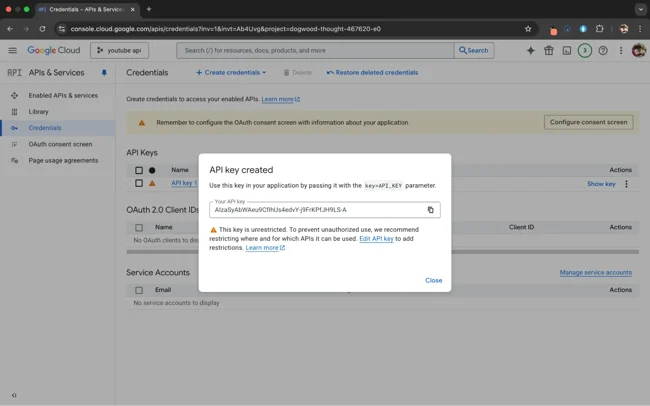
Your quota is 10,000 units. One exposed key can burn it in under an hour. This guide covers the exact mechanics of how auth works, where the real risks are, and how to build something that won’t fall apart when it matters.
Those numbers aren’t hypothetical. They describe what’s already happening — and YouTube API keys are in that pool. Google API keys were among the most common leaked secrets caught by GitGuardian’s generic detectors in 2023 and 2024. The question isn’t whether this is a real risk. It’s whether your setup is one of the ones that gets hit.
What this guide covers
The Quota Math Nobody Shows You
Per Google’s official documentation, every project using the YouTube Data API v3 gets 10,000 units per day by default. Units reset every 24 hours. What the docs don’t emphasize up front is how fast those units go.
YouTube Data API v3 — Quota costs per request (verified against Google’s quota calculator, Dec 2025)
Default daily budget: 10,000 units — equivalent to 100 search requests, or 10,000 videos.list calls. That gap is the whole problem.
Do the math on a search-heavy app. Say you’re building something that searches YouTube on each user query. 100 users make 1 search each — you’re out of quota for the day. That’s it. App breaks. And the error isn’t graceful; unless you’ve handled the quotaExceeded response, your users just see a crash.
Thesis-complicating finding: where quota runs out isn’t always where you think
The common assumption is that your code burns the quota. The reality, when keys leak, is that someone else’s code burns it. A Palo Alto Unit 42 study found leaked credentials used within 19 minutes on average. For a 10,000-unit quota, 19 minutes of someone hammering search.list at any reasonable rate exhausts the budget before your actual users even make a request. The quota failure mode isn’t just efficiency — it’s the secondary effect of unauthorized access.
The practical optimization here is real: stop using search.list when you can get the same data from videos.list. If you already have a video ID, fetch it directly at 1 unit instead of searching for it at 100. This isn’t clever engineering — it’s the difference between an app that survives moderate traffic and one that doesn’t.
Beyond 10,000 units, Google requires a compliance audit before granting quota increases. They review your implementation against YouTube’s terms. Apps that have been scraping, re-selling data, or using the API in ways that violate policy don’t get more quota — they get suspended.
API Key vs OAuth 2.0: This Isn’t a Preference
A lot of guides present this as a choice. It’s not, really. The decision is determined by what data you need.
API keys work for public data: searching videos, reading channel metadata, fetching video stats on publicly visible content. The key identifies your project. It doesn’t represent a user. It can’t access anything private.
OAuth 2.0 is mandatory for anything involving user-specific data: uploading videos, reading private analytics, managing playlists on a user’s behalf, accessing their account settings. Per Google’s own credential documentation: “whenever your application requests private user data, it must send an OAuth 2.0 token.” Full stop.
| Factor | API Key | OAuth 2.0 | ⚠ Caveat |
|---|---|---|---|
| What it accesses | Public data only | Public + private user data | OAuth access without appropriate scopes still can’t access private data — scopes must match the action |
| Setup complexity | Generate key, done. ~5 minutes. | OAuth flow, consent screen, redirect URIs, refresh token handling. ~1-2 days properly. | Google strongly recommends using OAuth client libraries, not rolling your own token handling |
| Token lifetime | Permanent until revoked | Access tokens: 1 hour. Refresh tokens: long-lived but revocable. | OAuth’s short access token lifetime is a security advantage — a leaked access token expires. A leaked API key doesn’t. |
| Can be restricted? | Yes: IP, HTTP referrer, API scope | Yes: OAuth scopes limit what actions are possible | API key restrictions help but don’t fully protect against abuse — see Section 3 |
| Use in frontend code? | Technically yes. Practically unsafe. | Client secret must never reach frontend. Auth code + PKCE flow for SPAs. | Even “public” OAuth client IDs should not have unrestricted permissions — keep your client secret server-side |
“OAuth access tokens expire automatically — typically within an hour. An API key doesn’t expire until someone revokes it. That gap defines the risk difference between the two approaches.”
Editorial synthesis — sources: Aembit (Jan 2026); Google OAuth documentation (Aug 2025)
The operational trade-off is real. OAuth requires more upfront work — roughly one to two weeks versus one day for API keys, per security analysis at Aembit. But that setup is amortized across the entire lifetime of the integration. API keys require ongoing vigilance: watching for leaks, rotating regularly, monitoring for abuse. After initial OAuth setup, token refresh is automatic.
Why Frontend Keys Fail (Even Restricted Ones)
This is the thing most guides skip because it’s uncomfortable. They say “restrict your API key” and leave it at that. The restriction doesn’t actually solve the problem they imply it solves.
Here’s the failure mode. You restrict your key to your domain yourapp.com. A user opens developer tools. They see the API request. They copy the key. They make requests from their browser, also from what appears to be a browser context. Referrer headers can be spoofed. IP restrictions help more, but frontend code runs on the user’s machine — not your server.
Cross-source synthesis — finding not visible in any single cited source
The combination of two data points produces a more alarming picture than either alone. First: Palo Alto Unit 42 found leaked credentials used within 19 minutes on average. Second: GitGuardian found that 91.6% of exposed secrets remained valid after five days — meaning the vast majority of project owners never revoked them. Put these together: once a key leaks, there’s a better than 91% chance it’s still valid days later, during which time it’s actively being used. For a YouTube API project, that’s days of quota depletion before anyone notices.
The architecture fix isn’t complex. It’s just a proxy.
API key visible in client-side code. Any user can extract and abuse it.
API key lives server-side. Never reaches the client. You control rate limiting too.
Here’s a minimal Node.js/Express proxy. Not a framework or SaaS — this is what the core looks like:
// DO NOT put your API key here in source code// Load from environment variable insteadconst YOUTUBE_API_KEY = process.env.YOUTUBE_API_KEY;const express = require('express');const fetch = require('node-fetch');const rateLimit = require('express-rate-limit');const app = express();// Rate limit per IP: 20 requests/minute — adjust for your use caseconst limiter = rateLimit({ windowMs: 60 * 1000, max: 20, message: { error: 'Too many requests' }});app.use('/api/youtube', limiter);app.get('/api/youtube/search', async (req, res) => { const { q, maxResults = 10 } = req.query; // Validate inputs before they touch the API if (!q || q.length > 200) { return res.status(400).json({ error: 'Invalid query' }); } const url = `https://www.googleapis.com/youtube/v3/search?part=snippet&q=${encodeURIComponent(q)}&maxResults=${maxResults}&key=${YOUTUBE_API_KEY}`; try { const response = await fetch(url); const data = await response.json(); // Handle quota exceeded explicitly if (data.error?.errors?.[0]?.reason === 'quotaExceeded') { return res.status(429).json({ error: 'API quota exceeded' }); } res.json(data); } catch (err) { res.status(500).json({ error: 'YouTube API request failed' }); }});app.listen(3000);
That’s the meaningful part. The key never leaves your server. You add your own rate limiting on top of whatever YouTube enforces. And you can log every request, which means you’ll actually know when something’s wrong.
Environment variable note: “use environment variables” is the advice everyone gives, and most developers know it. The more specific failure is .env files committed to git. GitGuardian’s 2026 State of Secrets Sprawl report found 28.65 million new hardcoded secrets on public GitHub in 2025 — a 34% increase year-on-year. The commits that leak secrets often include .env files added accidentally when a developer made a private repo public. One line in .gitignore prevents this. Most people add it after the first incident.
# Environment files — never commit these.env.env.local.env.*.local*.env# Also check these common hiding spotsconfig/secrets.ymlconfig/credentials.json
Key Security: What Monitoring Actually Looks Like
“Monitor your API usage” is advice. Here’s what monitoring actually means in practice.
Google Cloud Console shows per-day and per-minute quota consumption for your project. That’s a starting point but it’s not alerting. You need to know when something spikes, not after the fact. Set up budget alerts in Cloud Console that notify you when quota hits 50%, 80%, and 95% — for a 10,000-unit budget that’s at 5,000, 8,000, and 9,500 units. A legitimate traffic spike looks different from abuse: legitimate traffic climbs gradually with user growth; quota abuse from a leaked key typically produces a sudden vertical line in usage graphs.
⚠ Key rotation schedule
Rotate API keys at minimum every 90 days, and immediately after any suspected leak. The reason 90 days matters: most enterprise security frameworks (SOC 2, ISO 27001) require credential rotation on a defined schedule. Without it, a key that leaked quietly — no immediate abuse, just harvested by a bot for later use — sits valid indefinitely. The Cloudflare 2024 breach started with unrotated service tokens from a prior incident. The prior incident was already known. The tokens just weren’t rotated.
Secret scanning deserves more than a mention. GitHub now runs push protection by default on public repos, which catches many patterns. GitHub reports blocking several secrets per minute with push protection, and has partnerships with Google Cloud to automatically revoke detected keys. That partnership is valuable but not a guarantee — detection speed varies, and the 19-minute abuse window from Unit 42’s research means damage can happen before revocation.
For local development, tools like Infisical, Doppler, or HashiCorp Vault remove the need for .env files entirely — secrets are fetched at runtime from a secure store. Vault is powerful but operationally complex; one r/devops observation worth quoting: roughly two-thirds of self-hosted Vault implementations are configured incorrectly and provide equivalent or less security than not using it. If your team doesn’t have dedicated infrastructure support, start with Doppler or Infisical.
Security setup checklist
.env added to .gitignore before first commitquotaExceeded error explicitly handled in code (not just a generic 403 catch)For Your Specific Situation
The backend proxy isn’t optional — it’s the minimum
The temptation for a side project is to put the key in frontend code “just for now” and deal with it later. The problem is that “just for now” code tends to ship. Once it’s in a git history, it’s there. GitHub secret scanning helps, but if the repo was public for any window of time, bots have already indexed it.
The access barrier here is real: server infrastructure costs something. But a minimal Node.js backend on Railway, Fly.io, or even a Cloudflare Worker is under $5/month and solves the problem entirely. It’s also where you want to be anyway once you have actual users.
Quota architecture is where most teams leave money on the table
The security basics — server-side keys, rotation, monitoring — are presumably in place. The production failure mode I see most often is quota architecture. Teams underestimate how quickly search.list costs compound at scale, and they don’t implement caching because it feels like premature optimization until the day it isn’t.
The thing worth calculating specifically: if your product surfaces YouTube search results, and you have 1,000 daily active users making an average of 2 searches each — that’s 200,000 quota units per day. Twenty times your default allocation. You’d have been hitting Google for a quota increase on day one.
videos.list at 1 unit vs search.list at 100 units means that serving cached search results and refreshing individual video metadata is a 99% quota reduction for the metadata refresh use case. That math is worth doing before you submit a quota increase request.What This Actually Costs to Get Wrong
The stakes aren’t abstract. A leaked key doesn’t just drain your quota — it can get your entire project suspended. Google tracks abuse patterns and when a project’s key is used to violate terms, the project gets flagged. Reinstatement requires explaining what happened and demonstrating remediation. That process takes time you don’t have when your product is down.
The financial exposure is also real. One documented case involving a Claude Opus API key ran for 4.5 days and accrued roughly $50,000 in compute charges on the victim’s account before they noticed. YouTube API is free within quota, so the direct financial risk is different — but the indirect cost of downtime, project suspension, and emergency remediation isn’t.
“The minimum implementation isn’t rotating keys and restricting referrers. It’s making sure the key never reaches the client in the first place. Everything else is defense in depth.”
Editorial synthesis — sources: Google Developers auth documentation; Aembit API security analysis (Jan 2026); Unit 42 credential exposure data (2024)
Start with the proxy. Add monitoring. Set up rotation on a calendar. Handle quotaExceeded explicitly in your code so you know when it happens instead of finding out from user complaints. These aren’t advanced practices — they’re the floor.
Internal resources
For more on building secure API integrations and backend development: CodeTalentHub — developer guides and backend patterns
Top 7 APIs Every Developer Should Master in 2025: Unlock 50% More Productivity and Revenue Growth
18 Must-Have Browser Tools for Developers & Creators: The Complete 2026 Toolkit
JavaScript Snippets Explained: The Complete Developer Guide 2026
This Simple API Integration Saved Me 20+ Dev Hours in 2026—Architecture, Data & Real Results
Top 10 Automation Hacks for Pro Devs in 2026
Best 15 AI Tools for Developers 2026
GitHub Treasures: 12 Underrated GitHub Repositories 2026: Hidden Gems Saving Teams $120K
🚀 Boost Workflow with these JS Snippets (2026): Essential Tools for Modern Developers
Chrome Add-on Requestly Review 2026: Features, Pros, Cons & Best Alternatives
The Ultimate Guide to Speedy API Integrations (For Beginners) 2026
Privacy Policy
Avoid These Domain Scams: A 2026 Survival Guide