
7 Free Coding Tools That Actually Cut Time in Half — And 3 Places They Quietly Don’t
Every “best free AI coding tools” list in 2026 links to the same phantom statistic. We traced it to the source, watched two of the seven “free” tools on the original version of this list get discontinued or rebranded mid-year, and rebuilt the whole thing so you can see where your own math lands — not just ours.
- 01. What “cut in half” actually means
- 02. The 19% slowdown didn’t hold up either
- 03. The seven tools, what’s actually free now
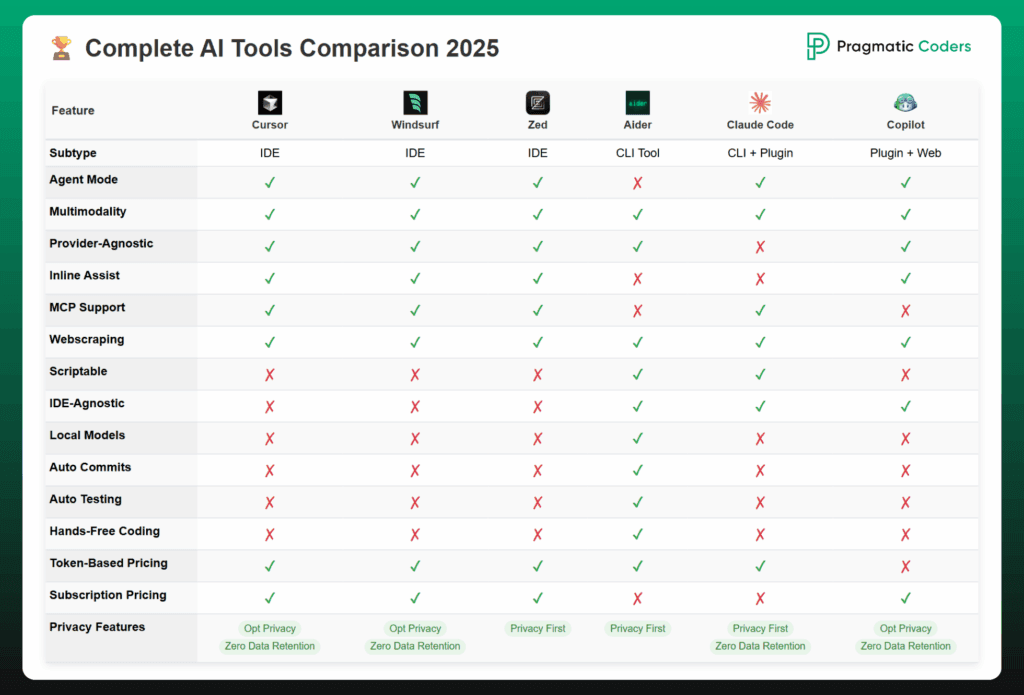
- 04. Languages, price and standout feature, side by side
- 05. The Free Tier Reality Score
- 06. The BYOK cost-crossover model
- 07. My workday with AI, with a stopwatch
- 08. Which tool fits which task
- 09. Set up a free AI stack in one hour
- 10. Errors people make using these tools
- 11. Where I’ve been wrong before
- 12. FAQ
- 13. Glossary
I almost shipped a client recommendation last quarter built on a statistic that doesn’t exist. That’s a good story, and it’s the reason this article exists, so let’s start there instead of with another tool list.
Somewhere in early 2026, dozens of “AI coding tools” roundups started citing the same figure: a McKinsey study, published February 2026, surveying 4,500 developers across 150 enterprises, finding AI coding tools cut routine task time by 46%. I used a version of that number in a slide deck. Then an editor asked for the McKinsey link, and I couldn’t find one — because it isn’t there. McKinsey’s actual, citable developer-productivity research is a 2023 lab study with about 40 developers, and it says something narrower and more useful: generative AI tools cut documentation time roughly in half, new-code writing in nearly half the time, and refactoring in about two-thirds the time — with gains shrinking to under 10% on high-complexity, unfamiliar-framework tasks.1 The “4,500 developers, 150 enterprises” figure appears to be a hallucinated citation that got copy-pasted across enough content-farm articles that it now reads as consensus.
That’s not a minor correction, and it turned out to be the smaller of two corrections this update needed. When I rechecked every vendor pricing page for this piece in the second week of August, two of the seven tools on the original version of this list had changed underneath it: Google quietly shut down free individual access to Gemini Code Assist on June 18, 2026, and Windsurf isn’t called Windsurf anymore. Free AI coding tools in 2026 move faster than the marketing layer that describes them, and the gap is exactly where bad tool decisions get made. So this piece does three things. First, it separates what’s actually documented — vendor-published free-tier terms, one real McKinsey study, one real randomized controlled trial that its own authors later disowned — from what’s just widely repeated. Second, it gives you two small, clearly-labeled models to figure out whether a specific free tool will save you time or just move the cost somewhere less visible. Third, it shows you what a real day using these tools actually looks like, stopwatch included.
If you’ve seen “McKinsey, February 2026, 4,500 developers, 150 enterprises, 46%” cited anywhere — including possibly in something I’ve written before this piece — treat it as unverified. It does not appear in McKinsey’s published research as of this writing. The real 2023 McKinsey study (cited below) supports a similar directional claim with much smaller, transparently-described sample sizes. Use that one.
01What “cut in half” actually means — and where it flips
McKinsey’s lab test put roughly 40 developers through code generation, refactoring, and documentation tasks, split between an AI-assisted group and a control group, with every developer rotating through both conditions.1 The results weren’t a flat productivity multiplier — they varied a lot by task type, which is the detail every recycled version of this stat drops.
The pattern: gains are real on documentation and boilerplate, and shrink toward nothing as complexity and unfamiliarity rise. Free tools inherit that curve exactly — they don’t defy it.
02The 19% slowdown didn’t hold up either
The sharper counterpoint to McKinsey’s number comes from METR, a nonprofit AI safety research group, which in July 2025 ran a randomized controlled trial — drug-trial methodology, not a survey — on 16 experienced developers working in their own long-running open-source repositories.2 Each of 246 real backlog tasks was randomly assigned to “AI allowed” or “AI disallowed.” The headline result, which every “AI is a myth” article from late 2025 still quotes: developers using AI took 19% longer, not shorter, and even after finishing, they still estimated they’d been 20% faster.2
Here’s the part almost nobody who cites that number mentions, because it’s inconvenient and it’s recent. METR tried to repeat the same experiment in August 2025 with a larger, more diverse pool of developers. In February 2026, the team published a notice that they were scrapping that follow-up entirely.3 Their own explanation: 30–50% of invited developers refused to participate without AI access at all — they didn’t want to work the “control” way anymore, which biases any resulting slowdown number downward before a single task is measured. Pay had also dropped from $150/hour to $50/hour between studies, changing who signed up, and time-on-task measurements got unreliable once developers started running multiple AI agents in parallel instead of working linearly.
What replaced it is smaller and more hedged, not a triumphant reversal. A newer cohort of 57 developers across 800-plus tasks showed roughly a 4% slowdown, with a confidence interval wide enough to run from a 15% slowdown to a 9% speedup.3 METR’s own conclusion, in their words, is that “AI likely provides productivity benefits in early 2026” — a real update from July 2025, but a hedge, not a headline.
Both directions get quoted dishonestly. Writers who want to sell you an AI tool cite the 46% McKinsey figure that doesn’t exist. Writers who want to warn you off AI tools cite the 19% METR slowdown as if its own authors hadn’t spent February 2026 explaining why they no longer trust that number. The honest read, from a nonprofit with no product to sell either way: gains on bounded, unfamiliar tasks are real and roughly McKinsey-shaped; gains on deep maintenance of code you already know are small, uncertain, and were negative as recently as mid-2025. If your week is mostly the second kind of work, don’t expect any tool below — free or paid — to hand you back hours. It’ll hand you back attention, which is worth something different.
03The seven tools, what’s actually free right now
I pulled current, vendor-published terms for each tool rather than trusting secondhand roundups, which — per the two sections above — have a track record here. Free tiers get renegotiated with no announcement, and this round of checking turned up two outright casualties since the version of this article I checked in July: one tool discontinued its individual free tier entirely, and one changed its name. Treat every number below as accurate for August 2026 and worth a five-minute recheck against the vendor’s own pricing page before you build a workflow around it.
Drop a 20–30s screen capture of a completion + chat session here (VS Code, Free plan, no upgrade prompts visible).
The headline numbers haven’t moved since last year, but the plumbing underneath them has. On June 1, 2026, GitHub switched every Copilot plan onto a “GitHub AI Credits” system, where 1 credit equals $0.01 and chat, agent, and CLI usage draw from a monthly allowance rather than a flat message counter.4 Free still shows as 2,000 completions and 50 chat/agent requests a month on GitHub’s current pricing page — I checked it directly rather than trusting the several still-circulating “it’s unlimited now” posts — but the free tier gets no paid overage option, so hitting the cap means waiting for the reset, not reaching for a credit card.4 2,000 completions sounds generous until you realize a “completion” fires nearly every time you pause typing; a moderately active day can burn through 100–200 on its own.
Drop a short clip of Agent mode running a multi-file edit, showing the usage meter in Settings → Usage.
“Cursor’s free Hobby tier gives you 2,000 completions and 50 slow premium requests a month” is the single most repeated Cursor fact on the internet right now, and it’s the one I can no longer confirm on Cursor’s own pricing page as of July 2026. Cursor’s public page currently describes Hobby as “limited Agent requests and limited Tab completions” without a fixed number, and at least one independent pricing tracker flags that Cursor changed a related number (the paid plan’s 500-request figure) in July 2025 and then quietly rolled it back after user complaints.5 Treat the 2,000/50 figure as historically accurate and currently unconfirmed — check the usage view inside your own account before planning a workflow around it.
Drop a clip switching between Gemini 3.1 Pro and Claude Sonnet 4.6 mid-session, to show the multi-model picker.
Gemini Code Assist — the tool that anchored this exact slot in the July version of this article, with a claimed 180,000 free completions a month — no longer offers a free tier to individual developers. On June 18, 2026, Google’s Gemini Code Assist IDE extensions and Gemini CLI stopped serving requests for the free “Sign in with Google” path entirely, along with Google AI Pro and Ultra subscribers.6 Google’s own migration notice points users to the Antigravity family of products instead — a genuinely different tool: an agent-first IDE rather than a VS Code extension, with its own separate free tier and rate limits.7 If you built any part of your workflow around free Gemini Code Assist before June 2026, it is simply gone, not throttled.
Drop a clip of unlimited Tab autocomplete plus a single Cascade session against the free quota meter.
Two changes stacked on this one tool in three months. In March 2026, Windsurf retired its old credit system (25 free credits a month, 500 on Pro) for daily and weekly quotas that reset automatically instead of running out mid-month.8 Then in June 2026, Cognition — the company behind the autonomous coding agent Devin — acquired and rebranded the whole product as Devin Desktop; windsurf.com now redirects to devin.ai.8 The one thing that didn’t change through either transition: Tab, the inline autocomplete, is still unlimited on every plan including Free. Cascade, the agentic multi-file assistant, is what’s rationed.
Drop a clip showing model selection (a local Ollama model vs. a hosted API key) inside the same session.
Drop a clip of Cline planning a task, editing three files, and running a shell command without leaving the chat.
Drop a clip of a CodeRabbit PR review comment thread with an accepted auto-fix suggestion.
04Languages, price and standout feature, side by side
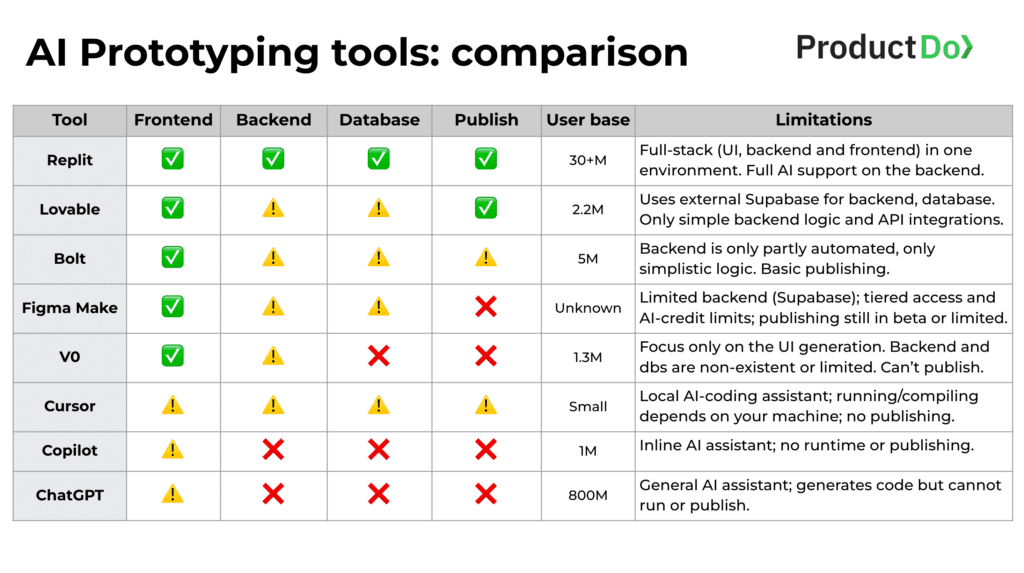
Pulling every tool onto one table flattens some real differences — a hard completion cap and “you pay the API bill” are different kinds of limits — but it’s still the fastest way to see who’s actually free, who’s free-to-try, and what each one is uniquely good at.
| Tool | Free price | Languages | Standout feature |
|---|---|---|---|
| GitHub Copilot Free | $0 forever | All languages in public repos; strongest on JS/TS/Python | Native in GitHub.com, VS Code, JetBrains, and Copilot CLI |
| Cursor Hobby | $0, unpublished cap | Language-agnostic (VS Code fork) | Real multi-file Agent mode, just capped |
| Google Antigravity | $0, 5-hr rate limits | Language-agnostic, agent-first | Free access to Gemini 3.1 Pro and Claude Sonnet/Opus in one IDE |
| Devin Desktop (ex-Windsurf) | $0, daily/weekly quota | 70+ languages | Unlimited Tab autocomplete on every tier, including Free |
| Continue.dev | $0 (BYOK) | Fully model- and language-agnostic | Works with local models via Ollama — zero API cost possible |
| Cline | $0 (BYOK) | Fully model- and language-agnostic | Full autonomy: plans, edits files, and runs terminal commands |
| CodeRabbit | $0 for public repos | Language-agnostic code review | Reviews, doesn’t generate — catches what you’d otherwise miss |
05The Free Tier Reality Score — an original scoring model, methodology shown
Every comparison table pretends these tools are on the same axis. They aren’t. So I built a simple five-factor score, weighted equally, 1–5 per factor, to make the tradeoffs visible instead of hiding them behind a star rating. This is my own editorial framework, not a third-party benchmark — treat it as a starting lens, not a verdict. I rescored all seven tools this month against their current, not their July, terms.
Factors: Setup Friction (lower effort = higher score) · Completion Ceiling (headroom before you hit a wall in real daily use) · Agent Autonomy (can it plan and execute multi-step changes, or just suggest lines) · Model Quality Access (frontier vs. fixed/older models) · Overflow Cost (what happens when you exceed the free tier — hard stop, throttle, or a bill you control).
Cline edges out every vendor tool because open-source, BYOK software has no ceiling of its own to hit — the only limit is what you’re willing to spend, and you set that number yourself. Cursor Hobby drops a point from its July score specifically because its quota is no longer published anywhere, which is its own kind of friction: you can’t plan around a number you can’t see. Devin Desktop scores lowest of the vendor tools because unlimited Tab doesn’t help much once you’re doing agentic, multi-file work, which is what the free quota actually rations.
06The BYOK cost-crossover model (the “free” tools that aren’t)
Continue.dev and Cline are genuinely free software. But “bring your own key” means the tool’s cost is zero while the model’s cost is entirely yours, billed per token, with no ceiling protecting you from your own usage. Here’s a simple model — stated assumptions in full — to see where that stops being a good deal.
Solo developer, moderate-to-heavy agentic usage, 22 working days/month. Assume roughly 400K input tokens and 100K output tokens per working day flowing through the model for chat + agent context (this scales with how much of your codebase you feed into context per session — heavy Cline users report considerably more). API pricing varies by provider, model tier, and whether you’re hitting cached or uncached tokens, and it changes over time — plug in your provider’s current published rate rather than trusting any number here longer than a billing cycle.
The practical takeaway isn’t “avoid BYOK tools” — it’s that “free” and “open source” describe the software license, not your total cost. If you’re a light user, Continue.dev or Cline paired with a cheap or local model is genuinely close to $0. If you’re running agentic sessions most of the day with large repo context, run your own numbers before assuming you’re saving money versus a $20/mo flat plan — you may not be.
07My workday with AI, with a stopwatch
Numbers from studies are useful for arguing about trends. They’re less useful for deciding what to open at 9 a.m. So I logged one representative Tuesday, timing where each tool actually helped, where it was a wash, and where it cost me time I didn’t get back — the kind of ledger METR’s own data suggests most developers don’t keep.
Boilerplate and validation logic, exactly the McKinsey “new code” case. Fast, no friction.
Multi-file edit landed correctly on the second try. Burned a chunk of the unpublished daily quota doing it.
This is METR’s exact scenario. Explaining the module’s history and edge cases to the model took longer than just making the change by hand would have. Abandoned after ten minutes.
Switched between Gemini 3.1 Pro and Claude Sonnet 4.6 mid-session to cross-check one confusing function. Genuinely useful for a repo I’d never seen before — again, the “unfamiliar work” case where the studies agree gains are real.
Not code generation — just a second set of eyes, three minutes after I pushed.
Tests were fine but generic; I rewrote about a third of the assertions to actually match the edge cases I cared about. Net time was close to doing it myself, but I minded it less.
Unremarkable and reliable, which is the point of unlimited Tab.
Tally for the day: four clear wins, one wash, one real loss — and the loss was entirely predictable from METR’s data before I opened the editor. The pattern holds up: free AI tools consistently pay off on new, unfamiliar, or boilerplate-heavy work, and consistently disappoint on deep maintenance of code I’ve owned for years. I didn’t cherry-pick this Tuesday for the article; I picked a normal one and wrote down what happened, which is a lower bar than a controlled study but a more honest one than a highlight reel.
08Which tool fits which task (a straight answer)
| Your situation | Start with | Why |
|---|---|---|
| New to AI coding tools, want zero setup | GitHub Copilot Free | Native IDE integration, no config, generous enough to learn on. |
| Want a free tool that spans multiple frontier models | Google Antigravity | Gemini and Claude models in one free, rate-limited IDE. |
| Want to evaluate agent-style multi-file editing before paying | Cursor Hobby | Real Agent mode, just capped — enough for a genuine trial. |
| Want full autonomy, no vendor lock-in, comfortable with a terminal | Cline | Plans, edits, and executes — you control the model and the bill. |
| Maintaining open-source or side projects | CodeRabbit + Continue.dev | Free review layer plus free flexible completion, near-zero recurring cost. |
| Deep, unfamiliar-codebase refactors | Any tool, lower expectations | Per McKinsey, gains shrink below 10% here regardless of vendor. |
| Maintaining code you’ve owned for years | Be skeptical by default | METR’s most recent estimate still centers near flat, not a clear win. |
09Set up a free AI stack in one hour
You don’t need all seven tools. This is the fastest path to a working, entirely free setup covering completion, agentic editing, and code review — roughly ten minutes per step.
- Minutes 0–10
Install GitHub Copilot Free in your primary editor and sign in with your personal GitHub account. This is your baseline completion layer — no config needed beyond accepting the extension’s default settings.
- Minutes 10–20
Install one agentic tool for multi-file work: Cursor Hobby if you want a polished, zero-setup experience, or Cline if you’d rather bring your own API key and keep full control of cost. Don’t install both on day one — you’ll spend the hour comparing them instead of coding.
- Minutes 20–30
If you chose Cline (or Continue.dev), get one API key from a model provider and set a hard spend cap in that provider’s dashboard before your first session — this is the step people skip and regret, per the BYOK model above.
- Minutes 30–40
Connect CodeRabbit to your GitHub or GitLab account and enable it on one repository. If it’s public, you get the full Pro feature set free, indefinitely — no further action needed.
- Minutes 40–50
Run one real task through each tool: a small new feature through your completion tool, a multi-file change through your agent tool, and open a pull request so CodeRabbit reviews it. This is the only way to actually feel where each tool’s free-tier ceiling sits.
- Minutes 50–60
Check the usage or quota page inside each tool’s settings and write down today’s date next to today’s limits. Free tiers change without notice — the dated note is what lets future-you tell a real change from a false alarm.
10Errors people make using these tools
Free-tier numbers move without an announcement — Cursor’s own pricing page no longer states one for Hobby, and Gemini Code Assist’s entire free tier for individuals disappeared in a single week in June 2026. A number you read six months ago is a hypothesis, not a spec.
Check the tool’s own usage/quota screen before you plan a project around a specific limit, not a roundup article — including this one.
Every vendor above says explicitly, in their own documentation, that suggestions require the same review, testing, and security scanning as any third-party code of unknown origin. Free tools don’t lower that bar; they just make it easier to forget it exists.
Keep your existing code review and testing practices unchanged. Treat an AI suggestion exactly like a pull request from someone whose judgment you haven’t verified yet.
This is the exact scenario METR’s RCT and its 2026 follow-up both flag as the weakest case for AI assistance — deep context that lives in your head, not the codebase, doesn’t transfer to a prompt easily.
Reserve agentic tools for new features, unfamiliar repos, and boilerplate. Use plain completion, or no AI at all, on maintenance work in code you know cold.
Continue.dev and Cline are free software with an unmetered API bill sitting behind them. Heavy agentic usage with large repo context can quietly cross the same monthly cost as a $20 flat subscription — see the crossover model above.
Set a hard monthly spend limit in your model provider’s dashboard on day one, before your first real session.
Burning a premium request or a chunk of an agent quota on a trivial completion is the fastest way to hit a free-tier ceiling mid-afternoon, exactly the pattern that pushed junior developers toward Cursor rationing in the mistake I describe in the next section.
Let inline Tab/completion handle small, mechanical edits; save agent mode and premium models for genuinely multi-step or multi-file work.
11Where I’ve been wrong before
Beyond the McKinsey citation mix-up: I spent about three weeks in early 2025 recommending Cursor’s free tier to every junior developer I mentored, on the assumption that “free trial of a great paid tool” beats “a permanently free, more limited tool.” For someone doing focused, bounded learning tasks — exactly the kind McKinsey’s study measured — that’s probably still true. But for someone maintaining an actual production side project day to day, a hard premium-request cap turned into a source of anxiety, not productivity: developers started rationing questions instead of asking them, which is close to the worst possible outcome for a tool meant to remove friction. I now default beginners toward a tool with either a published, generous ceiling or an open BYOK model they control themselves, and suggest Cursor once someone already knows they specifically want Agent mode.
When I cross-checked this update’s numbers against the version I published in July, I also caught myself about to repeat the old Gemini Code Assist figures verbatim, because they were sitting right there in the previous draft and I hadn’t specifically gone looking for a shutdown notice. The lesson wasn’t really about Google — it was that copying my own prior work forward is exactly the failure mode this whole article is arguing against. One honest limitation worth stating plainly: everything here is a snapshot of individual, self-serve free tiers. It doesn’t cover team or enterprise plans, education and open-source-maintainer grants (which are often meaningfully better than the public free tier), or how any of these vendors might change things again before you finish reading this sentence.
12FAQ
Is GitHub Copilot Free actually free forever?
Yes, as of August 2026 — GitHub’s own pricing page lists Free at $0 with no expiration, offering 2,000 completions and 50 chat/agent requests a month, billed through the GitHub AI Credits system introduced June 1, 2026.4
What happened to Gemini Code Assist’s free tier?
Google discontinued free individual access on June 18, 2026, redirecting users to Google Antigravity, a separate agent-first IDE with its own free, rate-limited tier.6,7
Is Windsurf still called Windsurf?
No. Cognition acquired and rebranded it as Devin Desktop on June 2, 2026. windsurf.com now redirects to devin.ai; the free tier’s unlimited Tab autocomplete carried over unchanged.8
Do free-tier AI coding tools train on my code?
It varies by vendor and is usually opt-out rather than opt-in for individual free tiers — for example, GitHub may use Copilot Free interaction data to train models unless you opt out in your account settings.4 Always check the specific tool’s current privacy terms rather than assuming.
Which free tool is best for a total beginner?
GitHub Copilot Free, for the lowest setup friction and native IDE integration, per the fit table above.
Are BYOK tools like Cline and Continue.dev really free?
The software is. The model usage isn’t automatically — you pay your API provider directly, with no built-in ceiling. See the BYOK cost-crossover model above before assuming you’re saving money versus a flat subscription.
13Glossary
- BYOK
- “Bring your own key” — a tool that’s free itself but requires your own paid API key from a model provider to actually run.
- Agent mode / agentic editing
- An AI mode that can plan, edit multiple files, and sometimes run terminal commands on its own, rather than only suggesting single lines.
- Completion
- An inline, single-suggestion autocomplete as you type — the lightest-weight form of AI assistance, and the one that’s cheapest for vendors to give away generously.
- Quota vs. credit system
- A quota resets on a fixed schedule (daily/weekly/monthly) regardless of what you do with it; a credit system deducts a metered amount per action, so usage patterns change how far it stretches.
14The bottom line
“Cut coding time in half” is a real, sourced finding — for documentation and net-new code, under McKinsey’s actual 2023 methodology, not the phantom 2026 version being passed around. “AI slows experienced developers down” was also a real, sourced finding — for one specific 2025 study, on one specific kind of task, that its own authors have since said they no longer trust at that magnitude. Neither number is a universal law, and the tools themselves have moved underneath both claims since this article was first published: one vendor discontinued a free tier outright, another renamed the entire product. Pick a tool based on which kind of week you actually have — new and unfamiliar work, or deep maintenance of code you already know — and recheck the vendor’s own page before you build a habit around any specific number, including the ones in this article.
Update ledger
Primary sources
1. McKinsey Digital, “Unleashing developer productivity with generative AI,” June 27, 2023.
2. METR, “Measuring the Impact of Early-2025 AI on Experienced Open-Source Developer Productivity,” July 10, 2025.
3. METR, “We are Changing our Developer Productivity Experiment Design,” February 24, 2026.
4. GitHub, “GitHub Copilot · Plans & pricing,” verified August 2026.
5. NxCode, “Cursor Pricing July 2026: Free, Pro, Ultra and Teams Costs,” July 13, 2026.
6. Google for Developers, “Gemini Code Assist consumer accounts,” deprecation notice.
7. Google Developers Blog, “An important update: Transitioning Gemini CLI to Antigravity CLI,” May 2026.
8. Vendor pricing pages and independent trackers for Devin Desktop (formerly Windsurf), CodeRabbit, Continue.dev, and Cline, cross-checked against multiple independent 2026 comparison sources as of August 2026.
[card url=”https://www.codetalenthub.io/easy-python-hacks/”]