
USEFUL BROWSER EXTENSIONS· Last updated August 31, 2026· ~14 min read
A Developer’s Guide to Browser Extensions (and a Few OS Tools)
Most “focus extension” roundups are the same eleven names copy-pasted since 2019. This one accounts for what a lot of that advice still hasn’t caught up to — Chrome finished retiring the old blocking engine most of these tools relied on, AI chat panels became a new rabbit hole, and this guide tells you plainly what’s verified, what’s vendor-claimed, and what you still need to test yourself.
You open the browser to check one Stack Overflow answer. Forty minutes later you’re reading a GitHub issue thread about a bug you don’t have, in a repo you don’t use, and the function you were writing is still half-finished in the editor behind the tab. If that sounds familiar, the problem usually isn’t willpower. It’s that your browser was never designed to protect your attention — it was designed to hold it for as long as possible, and every tab you open competes with the one thing you actually opened the browser for.
This guide is about the extensions and companion tools that fight back: what each one actually does, why several got quietly weaker in the past two years, and how to build a stack that survives contact with a real deadline.
This is a desk-research synthesis, not a week-long hands-on test of every tool — and it’s worth being direct about what that means. The tool descriptions, pricing, and platform support come from vendor documentation and current Chrome Web Store / Firefox Add-ons listings (checked for last-updated dates and recent review sentiment, not just feature copy). The “hard to bypass” claims for locked-mode features are vendor claims unless a source says otherwise — we’ve flagged those explicitly rather than presenting them as independently verified. Where a tool’s core mechanism is simple enough to reason about directly (a domain blocker either blocks the domain or it doesn’t), that’s a fair basis for a recommendation. Where it isn’t — does a “locked block” actually survive a determined attempt to kill it? — treat this guide as narrowing your shortlist to two or three candidates, then verify the one you pick against your own setup before you rely on it for a deadline.
Why a five-minute detour costs you thirty
Writing code isn’t like answering email. Before you can write the next line, you have to reload a working model of variable state, call stack, the bug you’re chasing, and the edge cases you’d already ruled out. That reload is why a five-minute YouTube detour rarely costs five minutes — research on developer context switching (most usefully summarized by Jellyfish’s analysis of interrupted engineering work) puts the real cost at 15–30 minutes of lost coding time per meaningful interruption, with interrupted tasks taking roughly twice as long and carrying roughly twice the error rate of uninterrupted ones.
You’ll see “23 minutes and 15 seconds to refocus” cited everywhere. That exact figure isn’t in Gloria Mark’s peer-reviewed papers — it comes from a 2006 Gallup interview where she described her UC Irvine field research in round numbers. The actual CHI studies found something close but not identical: workers spent about 11 minutes in a task before switching, and took about 25 minutes on average to return to an interrupted one.
See the full sourcing breakdown, if you want it
“No Task Left Behind?” (Mark, Gonzalez & Harris, CHI 2005) is the source of the 11-minute working-sphere figure and the finding that 57% of studied work was interrupted. The ~25-minute return-to-task figure comes from the same paper. “The Cost of Interrupted Work” (Mark, Gudith & Klocke, CHI 2008) is the widely misattributed source of “23:15” — it doesn’t contain that number either, though it does show interrupted workers often finished just as fast, at the cost of measurably more stress and effort. The 23:15 figure itself traces to Mark’s 2006 Gallup Management Journal interview, not a published measurement. None of this changes the practical takeaway — interruptions are expensive for anyone doing cognitively loaded work — it just means the internet has been citing the wrong paper for two decades.
What Manifest V3 actually changed — and when it happened
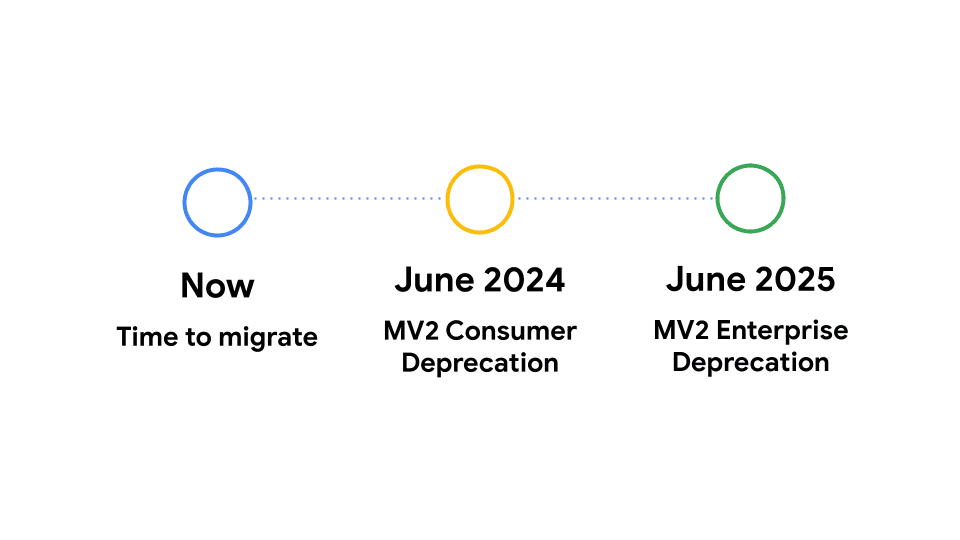
If you set up a blocker extension a few years ago and it feels less reliable now, you’re not imagining it, but the timeline is worth getting right: this didn’t happen recently. Chrome began disabling Manifest V2 extensions on the stable channel in October 2024, and by Chrome 138 in July 2025, Manifest V2 stopped running for essentially everyone, including the last enterprise exemption a month later. Google is set to remove the remaining Manifest V2 listings from the Chrome Web Store this year — a cleanup step, not a new behavior change. If your extensions still work today, they’re already running on the newer framework.
The framework itself is what matters. Manifest V3 replaced the old webRequest API — which let an extension inspect and cancel network requests live, in JavaScript, as they happened — with declarativeNetRequest, which forces an extension to pre-declare a static set of rules that Chrome itself enforces. Google raised the static rule ceiling from an initial 30,000 to a much larger cap after pushback from the EFF and extension developers, but the core limitation stands: an extension can no longer watch a request happen and decide what to do about it in real time.
Firefox took the opposite path and kept full webRequest support alongside declarativeNetRequest, so classic, dynamically-updating blockers still run at full strength there. That’s why privacy and productivity communities converge on “Firefox plus the old-school version of your blocker” as the reliable setup, while Chrome users are pushed toward either MV3-native extensions or system-level tools that sit outside the browser entirely.
For a coding-distraction blocker specifically, this matters less than it does for ad blocking — most site blockers just need to match a domain and show a block page, which declarativeNetRequest handles fine. Where it bites is in extensions that used to do dynamic, content-aware blocking. If your blocker feels less sharp than it used to, this is almost certainly why, and the fix is usually to check whether it’s shipped an MV3-native rebuild rather than to assume you did something wrong.
A framework: the three layers of a distraction
Most “best blocker” lists compare extensions as if they’re interchangeable. They’re not, because a coding distraction doesn’t happen at one layer — it happens at whichever layer has the weakest defense that day. A useful way to think about it:
This is the mental model that explains why “just install StayFocusd” advice fails so often for developers specifically: your distractions rarely live on sites you can fully block. You need Stack Overflow, GitHub, and YouTube to do your job. The tool has to remove the addictive feature, not the site.
AI chat sidebars are a Layer 3 problem, and the fix has to be a habit, not an extension
Last year’s version of this advice stopped at YouTube and social media. For a lot of developers in 2026, the more common rabbit hole starts with a legitimate question — “why is this error happening” — asked in Copilot Chat, Cursor’s chat sidebar, or a browser-based AI tool, and turns into twenty minutes of prompt refinement, follow-up questions, and tangential exploration that has nothing to do with the original bug. It’s the same mechanism as the YouTube spiral: a tool you genuinely need, with an open-ended interface that has no natural stopping point.
There isn’t yet a mature, well-reviewed browser extension that specifically time-boxes an AI chat panel the way Unhook time-boxes YouTube, so it doesn’t get a table row below. That’s a real gap, not an oversight — and the honest workaround is more specific than generic “use a timer” advice:
- Separate the chat interface from your inline completions where the tool allows it. In VS Code, GitHub Copilot’s inline “ghost text” suggestions and the Copilot Chat panel are controlled separately — you can leave autocomplete on and still close the Chat panel entirely between uses, rather than leaving it docked and open as a standing invitation. Cursor similarly separates its Tab-completion behavior from Composer/Chat mode in its settings; check your installed version’s settings screen, since the exact menu wording changes across releases.
- Isolate the AI panel in its own browser profile or container (a dedicated Chrome profile, an Edge Workspace, or a Firefox container via the Multi-Account Containers extension) for any browser-based AI tool, so closing that one window ends the session instead of leaving a tempting tab sitting in your main window.
- Treat one AI question as one task inside the Pomodoro block you’re already running, not a separate open-ended activity — ask, get the answer, close the panel, and resume the timer, with the hard stop already decided before you open the chat.
If a purpose-built extension for this becomes worth recommending, we’ll add it here and update the table — but we’d rather leave the slot empty than recommend something untested to fill it.
Browser extensions: what each one actually does, as of August 2026
These run inside the browser itself (Layer 2 and Layer 3). Pricing below is current per each vendor’s own pricing page as of this update — verify before you commit a team to one, since these change without much notice.
| Extension | Layer | Platforms | Price | Hard to bypass? | Best for |
|---|---|---|---|---|---|
| LeechBlock NG | Browser | Chrome, Firefox, Edge, Brave, Opera, Vivaldi | Free, open source | Yes — password lock, up to 30 rule-based block sets | Developers who want granular, regex-capable scheduling and don’t mind a setup curve |
| StayFocusd | Browser | Chrome, Edge | Free | Nuclear Option is strong, but development has slowed | A five-minute setup with daily time budgets rather than hard schedules |
| BlockSite | Browser | Chrome, Firefox, Edge, Safari, iOS, Android | Free (3 sites) / paid tiers unlock more | Moderate — easy UI, easy to disable | Cross-device sync on a budget; check the privacy policy before installing on a work machine |
| one sec | Browser + app | Desktop extension free; Mac app; no free mobile app | From $2.99/mo to $99.99 lifetime | Friction, not a hard block — a breathing pause before you proceed | People who don’t want a wall, just a moment to reconsider before opening the tab |
| Unhook | Within-site | Chrome, Firefox, Edge | Free | Not a block — removes the recommendation feed itself | Killing the “one tutorial becomes forty minutes” YouTube spiral without losing YouTube |
| News Feed Eradicator | Within-site | Chrome, Firefox | Free | Not a block — replaces the feed with a quote | Keeping Slack/X/Facebook usable for DMs and links without the infinite scroll |
| OneTab | Browser (housekeeping) | Chrome, Firefox, Edge | Free | Not a blocker — collapses tab sprawl that causes its own distraction | The 40-open-tabs problem that makes it easy to “just check” something |
“Hard to bypass” reflects each vendor’s own claims plus what independent reviews report — not tool-by-tool testing on our end. Treat it as a starting signal, and confirm it holds up on your own machine before you rely on it under deadline pressure.
OS-level and cross-device tools: a different category, worth knowing about
These sit outside the browser (Layer 1) and are the answer when a browser extension keeps losing to “just open a different browser.” They’re not extensions, and including them here is deliberate, not a scope mix-up: if your real distraction survives every Chrome blocker you’ve tried, the honest next step is one of these, not another extension.
| Tool | Platforms | Price | Hard to bypass? | Best for |
|---|---|---|---|---|
| Freedom | Mac, Windows, iOS, Android, Chrome | $8.99/mo or $39.99/yr, per Freedom’s pricing page | Locked Mode is Freedom’s own claim for preventing mid-session edits — we haven’t independently verified it across every OS build | Blocking the same sites across your laptop and phone at once |
| Cold Turkey | Windows, Mac | $45 one-time (Pro), per Cold Turkey’s pricing page | Pro’s locked blocks are widely reported as very hard to override; the free tier’s blocks can simply be cancelled, so the “unbeatable” reputation applies to Pro specifically | The person who has already uninstalled three other blockers mid-session |
Which failure pattern is actually yours?
The tables above tell you what each tool does. This is about diagnosis — the same tool fails or succeeds depending on which of these three you actually are, so pick the archetype before you pick the row.
The Re-opener Layer 2 → escalate to Layer 1
You install a blocker, it works for two days, then you catch yourself clicking “disable for 5 minutes” out of habit rather than real need. The tool was never the problem — the negotiation was. A flexible daily budget gives you something to negotiate with; a locked schedule doesn’t. If you’re a Re-opener, the fix isn’t a better extension, it’s removing your own ability to override it: password-lock the settings, switch from a time budget to a hard schedule, or skip the browser layer entirely and go straight to something like Cold Turkey that isn’t yours to disable mid-block.
The Researcher Layer 3
Your distraction isn’t a site you could ever block — it’s Stack Overflow, GitHub, docs, or an AI chat panel, all things you genuinely need open. Blocking the domain would cost you real work, so it’s not on the table. Your fix lives one layer down: strip the feature that turns “quick lookup” into a spiral (Unhook for YouTube’s recommendations, News Feed Eradicator for social feeds still needed for DMs or links, a hard personal rule for AI chat panels) while leaving the tool itself fully usable.
The Escape Artist Layer 1
You’ve already tried two or three browser extensions and worked around every one of them — often just by opening a different browser. If that’s you, staying at the browser layer is a waste of time; the honest move is to stop there and go system-wide. Freedom if the same block needs to hold across your laptop and your phone. Cold Turkey’s Pro tier (Windows/Mac only, $45 one-time) if you want its widely-reported reputation for surviving a Task Manager kill attempt — that reputation is specific to Pro’s locked blocks, since the free tier’s blocks can be cancelled at will. If you want something that covers every device on your home network at once regardless of browser, a DNS-level filter like the free, self-hosted Pi-hole or the cloud-based NextDNS (free up to 300,000 queries/month) blocks at the network level before a site even loads — just don’t schedule a lockdown over a window where you might genuinely need a “blocked” site for real work.
Build your stack in four steps
- Track for three days before installing anything. Your browser history (or a lightweight extension like RescueTime) will tell you which layer is actually costing you time. Most people guess wrong — they blame social media when the real leak is GitHub notification badges or a 40-tab backlog.
- Match the tool to the layer, not the reputation. A Layer 2 site blocker won’t fix a Layer 3 problem (you still need GitHub open), and a Layer 3 tool won’t fix a Layer 1 problem (you’ll just switch browsers). Use the tables above to place your actual distraction before picking a tool.
- Password-lock or hard-schedule at least one layer. A blocker you can disable in two clicks the moment you’re tempted isn’t a blocker, it’s a suggestion. Pick the one tool in your stack that matters most and make it genuinely inconvenient to override.
- Review after two weeks, not two days. The first few days of any new blocking tool feel restrictive by design — that’s the habit breaking, not the tool failing. Judge it against your three-day baseline, not against how it feels on day one.
The mistakes that quietly undo all of this
Blocking an entire domain like stackoverflow.com or github.com to stop one bad habit (browsing unrelated repos, reading tangential questions) usually backfires — you end up disabling the blocker entirely the first time you need the site for real work, and the habit of clicking “disable” for five minutes becomes its own distraction. LeechBlock NG’s rule sets support matching specific paths rather than a whole domain, so you can target the actual leak — block a subreddit’s /trending or /r/all path instead of Reddit outright, or add a short delay before a page loads (LeechBlock and StayFocusd both support delayed blocking) instead of removing access entirely. The delay alone stops a lot of reflexive clicking without touching the site you still need.
If your blocker only runs in Chrome and Firefox is sitting in your dock, you don’t have a blocker — you have a two-second inconvenience. Either block across every browser you have installed, or move enforcement to the OS layer.
A blocker with no time boundary just gets “paused for 15 minutes” repeatedly until the session’s over. Scheduling — even a blunt 9-to-1 block — removes the in-the-moment negotiation that unscheduled daily limits invite.
Frequently asked questions
Do I need a paid tool, or is a free extension enough?
For most developers, a free browser-level tool (LeechBlock NG, StayFocusd, Unhook, News Feed Eradicator) covers the majority of coding distractions. Paid tools like Freedom and Cold Turkey earn their price when you need cross-device enforcement or a block that survives your own attempts to disable it — that’s a real, specific need, not a default upgrade everyone requires.
Is Manifest V3 going to break my Chrome blocker at some point?
The disabling already happened — Manifest V2 stopped running on stable Chrome in July 2025, so if your extension works today, it’s already on Manifest V3. For simple domain blocking, declarativeNetRequest handles “block this URL” rules fine. The extensions most affected were the ones doing dynamic, content-aware filtering (classic uBlock Origin being the best-known casualty). If a blocker feels weaker than you remember, check whether it’s shipped an MV3-native rebuild.
Should I block GitHub, Slack, or Jira while coding?
Usually not by domain — you need them for the job. Instead, mute non-essential channel notifications, turn off desktop alert badges, and batch-check them at set intervals (after each Pomodoro block, for instance) rather than blocking the tool outright.
What’s the actual difference between LeechBlock NG and StayFocusd?
LeechBlock NG supports up to 30 independent block sets with schedules, quotas, and regex-based rules — more power, more setup time. StayFocusd is built around a simpler daily time-budget model with one standout feature (the Nuclear Option, an irreversible block for the rest of the day) and a five-minute setup, but has seen slower recent development.
Do these tools work the same way on Firefox as on Chrome?
Not identically. Firefox retains full webRequest support alongside declarativeNetRequest, so extensions that rely on dynamic, real-time request inspection keep their full feature set there. On Chrome, all extensions run under Manifest V3’s more limited, pre-declared rule model.
Is Unhook the same thing as a website blocker?
No — it’s a feature-removal tool, not a blocker. YouTube stays fully accessible; Unhook hides the homepage feed, sidebar recommendations, end-screen suggestions, comments, and Shorts. It solves the “I came for one tutorial, I left forty minutes later” problem without taking YouTube away entirely.
What if I just disable the blocker every time I get tempted?
That’s the most common failure mode, and it usually means the wrong layer was chosen — see the framework above. If you’re routinely disabling a Layer 2 browser extension, either password-lock it, add a schedule instead of a flexible daily budget, or escalate to an OS-level tool like Cold Turkey that isn’t yours to disable mid-block.
Do blocking extensions slow down my browser or affect coding performance?
Lightweight rule-based blockers (LeechBlock NG, StayFocusd, Unhook) have a negligible resource footprint — they’re evaluating a small rule set, not running heavy background processes. Tools that add VPN-style traffic routing are the exception and can introduce a measurable network-speed cost.
Are there Linux-native options if I don’t use Chrome or Firefox on Windows/Mac?
Browser extensions like LeechBlock NG and StayFocusd work identically on Linux since they run inside Chrome, Firefox, or a Chromium-based browser regardless of OS. The gap is at the OS layer — Cold Turkey is Windows/Mac only. Two concrete alternatives that do work on Linux: self-host Pi-hole (free, runs well on a Raspberry Pi or any small Linux box) for network-wide DNS-level blocking, or edit your /etc/hosts file directly to redirect distracting domains to 0.0.0.0 — no software required, though it’s manual to maintain and easy to forget to revert.
What’s the single best first extension to install if I only install one?
There isn’t a universal answer, because it depends on which layer is actually costing you time — which is exactly why step one of the framework above is tracking your actual distraction pattern for a few days before installing anything. Guessing the tool before diagnosing the leak is the most common reason these setups get abandoned within a week.
Should I block or time-limit AI chat sidebars like Copilot Chat or Cursor’s Composer?
There’s no mature, well-reviewed extension built specifically for this yet, so we’re not recommending one just to fill the slot. The same principle that works for YouTube applies: don’t block the tool, since you need it — instead separate inline completions from the open-ended chat panel where your tool allows it, isolate the chat in its own browser profile if it’s web-based, and treat one question as one task inside the timer you’re already running.
Sources and further reading
The interruption-cost research below comes from the primary CHI papers and their citation trail — the strongest part of the sourcing here. The tool comparisons lean on a mix of vendor documentation and independent reviews; where a claim (like a “can’t be disabled” lock feature) originates with the vendor rather than independent testing, that’s noted in the text rather than presented as verified fact.
- Jellyfish — Mitigating Context Switching in Software Development — developer-specific interruption cost estimates
- oberien — Interruptions cost 23 minutes 15 seconds, right? — sourcing history of the widely misquoted figure, tracing back to Mark’s CHI papers and 2006 Gallup interview
- OpsMatters — How Ad Blocking Works in 2026: What Still Works After Manifest V3 — declarativeNetRequest vs. webRequest, browser-by-browser
- Cold Turkey — official user guide — Frozen Turkey, locked blocks, and the free-vs-Pro distinction, from the vendor directly
- FocusMe — 9 Best Website Blockers in 2026 — LeechBlock NG feature depth and free-tier comparison
- AlternativeTo — Unhook — current feature list and platform support
- Netmute — AdGuard Home vs. Pi-hole vs. NextDNS — DNS-level blocking comparison and current pricing
One more thing worth reading
If a bigger toolchain feels like the fix, read Workflow Enhancement vs. Automation first — more tools solve a leak only when you’ve actually diagnosed which layer it’s coming from, which is the same discipline this piece has been arguing for.